
 0
0
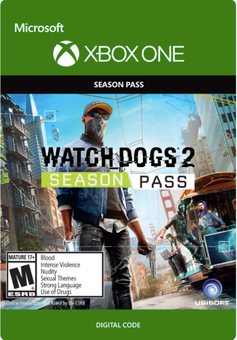
Continue your Hacker's journey with several hours of exclusive additional mission content, new co-op difficulty modes, outfits, vehicles, and many other customization items
- DLC 1: T-Bone Content Bundle. Get the style and the swagger of legendary hacker T-Bone Grady with his car and outfit, and discover a new co-op difficulty mode.
- DLC 2: Human Conditions - Hack your way through several hours of additional mission content in three new World Stories, and uncover San Francisco's biggest scientific scandals
- DLC 3 - No Compromise. Experience an all-new World Story which mixes Marcus up in the seedy underbelly of San Francisco - and gets him in the crosshairs of the Russian Mafia. Also includes a new co-op mode.
- Root access bundle including a full set of outfits, car, drone and gun items, and the Zodiac Killer mission.
- Psychedelic Pack to customize Marcus' outfit, weapon, drone and car in the wackiest style.
Platform
Xbox One (WW)-
HOW TO REDEEM XBOX ONE GAME CODE

Xbox One Console:
- Sign in to your Xbox One (make sure you’re signed in with the Microsoft account you want to redeem the code with)
- Press the Xbox button on the controller to open the guide, and then select Store.

- Press the View button on the controller to open the side menu, and then select Redeem.

- Enter your unique code that’s displayed on the ‘Orders’ page of CDKeys.com and select Next, and then follow the prompts.

Web Browser:
- On your PC or phone’s browser, navigate to https://redeem.microsoft.com
- Sign in with your Microsoft account credentials (make sure you’re signed in with the Microsoft account you want to redeem the code with).
- Enter your unique code that’s displayed on the ‘Orders’ page of CDKeys.com and select Next, and then follow the prompts.
Microsoft Store on Windows:
- On your PC, press the Start button , and then enter the store into the search bar.
- Choose Microsoft Store from the results to open the app and sign in with your Microsoft account credentials (make sure you’re signed in with the Microsoft account you want to redeem the code with).
- Select your account in the top-right corner of the screen, and then select Redeem code or gift cards.

- Enter your unique code that’s displayed on the ‘Orders’ page of CDKeys.com and select Next, and then follow the prompts.

Xbox App for Windows (ONLY PC):
- On your PC, press the Start button , and then enter Xbox into the search bar.
- Choose the Xbox app from the results to open the app and sign in with your Microsoft account credentials (make sure you’re signed in with the Microsoft account you want to redeem the code with)
- Select your gamerpic, and then select Settings.

- Select Redeem under Redeem a code.

- Enter your unique code that’s displayed on the ‘Orders’ page of CDKeys.com and select Next and then follow the prompts.




