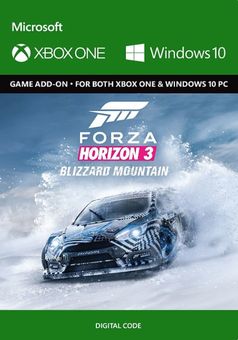
Forza Horizon 3: Blizzard Mountain Expansion Pack Xbox One
Platform
Xbox Play Anywhere
Release Date
13 Dec 2016
Language
English,Spanish,French,German,Italian,English-US
Top benefit: Delivery Time 1-3 secondFully automated trading
QUANTITY
- +
Add Cart
Surprise activity: Use the coupon "ffttl" to get a 5%-35% discount,Before Discount Price : USD 226.99$
-28%
USD 317.09$
USD 226.99$
FAQ
Load More
  • Get your instant download of Forza Horizon 3 Blizzard Mountain on Xbox One/PC with ffttl.com

    The top 3 reasons to play Forza Horizon 3 Blizzard Mountain

    1. Do you have what it takes to be King of the Mountain? You'll need all your skills to tackle extreme winter weather in this Forza Horizon 3 add-on.
    2. With insane elevations and drops, blinding snow storms, and icy roads   you will need a focussed mind to master these tracks. Challenge players in your quest to be the best.
    3. Collect eight new cars and trucks, including the 2016 Ford GYMKHANA 9 Focus RS RX, as you test your mettle against an alpine backdrop.

    What to know before buying Forza Horizon 3 Blizzard Mountain

    This add-on requires Forza Horizon 3 (game sold separately).

    Play anywhere with both Xbox One and Windows 10 compatibility. Redeem one code and play on all of your compatible devices.
    What's included with Forza Horizon 3 Blizzard Mountain?

      Forza Horizon 3 Blizzard Mountain DLC.

    Is there a region lock for Forza Horizon 3 Blizzard Mountain?

    No, the game is available worldwide.

    How will I receive my instant download for Forza Horizon 3 Blizzard Mountain?

    After payment has been approved, your game key will be included in your order confirmation email. You can access your key by following the link in that email and then you can activate it on its corresponding platform.

    If you’ve pre-ordered a game, your key will be sent to your chosen email a day before the official (or early access) release date. You will also receive a notification by email when your key is available.

    How do I activate the key for Forza Horizon 3 Blizzard Mountain on Xbox One/PC?

    For Xbox One:

    1. Load the “Home” screen (make sure you’re signed in to your Xbox Live account), and navigate right to “Store”.
    2. In “Categories”, select “Games”.
    3. Choose the “Use a code” option.
    4. Select the option to “enter the 25 character code”, and enter the code you received in your ffttl.com confirmation email.

    For PC:

    1. Load a web browser and navigate to this address: https://live.xbox.com/redeemtoken
    2. Sign in with your Microsoft account credentials.
    3. Enter the game code in your confirmation email and click “Next”; then follow the prompts to confirm.

    You can find additional support for your Xbox Live account here: https://support.xbox.com/contact-us

    Forza Horizon 3 Blizzard Mountain details

    • Snow, ice, blizzards and vertigo-inducing sheer drops makes the first expansion for Forza Horizon 3 a truly extreme one.
    • Master 8 new cars and trucks while testing out just how good your snow tires are on the tightest of mountain turns.
    • Challenge other players to take the King of the Mountain accolade. Do you have what it takes? Download today and find out!

    Want to get a free key for Forza Horizon 3 Blizzard Mountain?

    Our team regularly selects the best comments about a game and rewards that user with a free key. Simply share your feedback in the review tab for a chance to win!


    What are the system requirements for Forza Horizon 3 Blizzard Mountain?

    MINIMUM for Forza Horizon 3

    • Processor: Intel i3-4170 @ 3.7Ghz
    • Graphics: NVIDIA GT 740 or AMD R7 250x
    • Memory: 8GB
    • Disk space: 60GB
    • System: Xbox One and Windows 10 version 14393.102 or higher
    • VRAM: 2GB

    RECOMMENDED for Forza Horizon 3

    • Processor: Intel i7 3820 3.6GHz
    • Graphics: NVIDIA GTX 970 or NVIDIA GTX 1060 or AMD R9 290X or AMD RX 480
    • Memory: 12GB
    • Disk space: 60GB
    • System: Xbox One and Windows 10 version 14393.102 or higher
    • VRAM: 4GB
  • HOW TO REDEEM XBOX PLAY ANYWHERE GAME CODE

    Xbox One Console / Xbox Series X|S Console:

    1. Sign in to your Xbox One / Xbox Series X|S (make sure you’re signed in with the Microsoft account you want to redeem the code with)
    2. Press the Xbox button on the controller to open the guide, and then select Store.


    3. Press the View button on the controller to open the side menu, and then select Redeem.


    4. Enter your unique code that’s displayed on the ‘Orders’ page of CDKeys.com and select Next, and then follow the prompts.


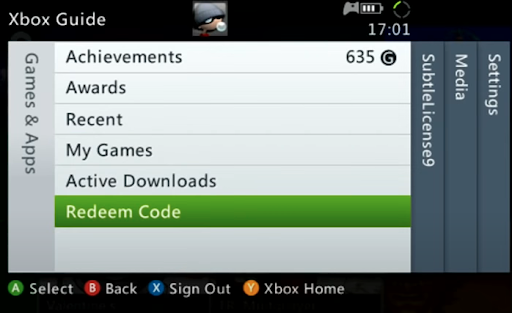
    Xbox 360 Console:

    1. Sign in to your Xbox 360 (make sure you’re signed in with the Microsoft account you want to redeem the code with)
    2. Press the Guide button on your controller
    3. Select Games & Apps, and then select Redeem Code.


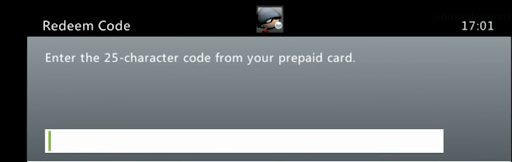
    4. Enter your unique code that’s displayed on the ‘Orders’ page of CDKeys.com and then follow the prompts.


    Web Browser:

    1. On your PC or phone’s browser, navigate to https://redeem.microsoft.com
    2. Sign in with your Microsoft account credentials (make sure you’re signed in with the Microsoft account you want to redeem the code with).
    3. Enter your unique code that’s displayed on the ‘Orders’ page of CDKeys.com and select Next, and then follow the prompts.

    Microsoft Store on Windows:

    1. On your PC, press the Start button , and then enter the store into the search bar.
    2. Choose Microsoft Store from the results to open the app and sign in with your Microsoft account credentials (make sure you’re signed in with the Microsoft account you want to redeem the code with).
    3. Select your account in the top-right corner of the screen, and then select Redeem code or gift cards.


    4. Enter your unique code that’s displayed on the ‘Orders’ page of CDKeys.com and select Next, and then follow the prompts.


    Xbox App for Windows (ONLY PC):

    1. On your PC, press the Start button , and then enter Xbox into the search bar.
    2. Choose the Xbox app from the results to open the app and sign in with your Microsoft account credentials (make sure you’re signed in with the Microsoft account you want to redeem the code with)
    3. Select your gamerpic, and then select Settings.


    4. Select Redeem under Redeem a code.


    5. Enter your unique code that’s displayed on the ‘Orders’ page of CDKeys.com and select Next and then follow the prompts.


FFTTL is your trusted platform to buy cheap game CD keys and digital codes. Enjoy instant delivery, huge discounts, and a wide range of popular games. Shop now and save!
paypal visa mastercard
$317.09
$226.99
Buy Now