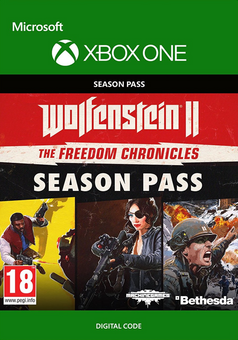
Wolfenstein 2: The Freedom Chronicles Season Pass Xbox One
Platform
Xbox Live
Release Date
27 Oct 2017
Language
English,Spanish,French,German,Italian
Developer
Machine Games
Top benefit: Delivery Time 1-3 secondFully automated trading
QUANTITY
- +
Add Cart
Surprise activity: Use the coupon "ffttl" to get a 5%-35% discount,Before Discount Price : USD 172.59$
-28%
USD 240.37$
USD 172.59$
FAQ
Load More
  • Note: Base Game Required. Available Here!

    Get your instant download of Wolfenstein 2: The Freedom Chronicles Season Pass on Xbox One with ffttl.com

    The top 3 reasons to get the Wolfenstein 2: The Freedom Chronicles Season Pass

    1. The Season Pass brings you the complete Wolfenstein II experience.
    2. Journey through America, 1961. Nazis rule the land... for now.
    3. As iconic war hero BJ Blazkowicz, your mission is to lead the Resistance in ridding the world of this Nazi scourge!

    What to know before buying Wolfenstein 2: The Freedom Chronicles Season Pass

    What's included with Wolfenstein 2: The Freedom Chronicles Season Pass?

    Wolfenstein 2: The Freedom Chronicles Season Pass includes:

    • The Adventures of Gunslinger Joe
    • The Diaries of Agent Silent Death
    • The Amazing Deeds of Captain Wilkins

    Is there any region lock for Wolfenstein 2: The Freedom Chronicles Season Pass?

    There is no region lock. This product is available worldwide.

    How will I receive my instant download for Wolfenstein 2: The Freedom Chronicles Season Pass?

    After payment has been approved, your game key will be included in your order confirmation email. You can access your key by following a link in the email. Next, you can activate your key on its corresponding platform.

    How to activate the key for Wolfenstein 2: The Freedom Chronicles Season Pass

    Xbox One Console:

    1. Load the “Home” screen (make sure you’re signed in to your Xbox Live account), and navigate right to “Store”.
    2. In “Categories”, select “Games”.
    3. Choose the “Use a code” option.
    4. Select the option to “enter the 25 character code”, and enter the code you received in your ffttl.com confirmation email.

    Web Browser

    1. Load a web browser and go to this address: https://live.xbox.com/redeemtoken
    2. Sign in with your Microsoft account credentials.
    3. Enter the game code from your email and click “Next”; follow the prompts to confirm.

    You can find additional support for your Xbox Live account here: https://support.xbox.com/en-US/contact-us

    Wolfenstein 2: The Freedom Chronicles Season Pass details

    • The Season Pass brings you the complete Wolfenstein II experience.
    • With The Freedom Chronicles, you'll get three new chapters and hours of new excitement!
    • Experience an adrenaline-pumping journey set in Nazi-controlled America in the 1960s.
    • As part of the Resistance, you'll team up with unforgettable characters to take down the evil Nazi army led by Frau Engel.
    • A long list of badass weaponry is at your disposal in The New Colossus-- from hatchets to grenade launchers!
    • The plan is simple in this critically acclaimed Wolfenstein title: kill Nazis!

    Want to get a free key to play Wolfenstein 2: The Freedom Chronicles Season Pass?

    Our team regularly selects the best comments about a game and rewards that user with a free key. Share your feedback in the review tab for a chance to win!

    What are the system requirements for the Wolfenstein 2: The Freedom Chronicles Season Pass?

    • Xbox Live account
    • Internet connection

    Genre

    Action, Singleplayer, Violent
  • Activate with Xbox


    Xbox One

      1. Sign in to your Xbox One (make sure you’re signed in with the Microsoft account you want to redeem the code with).
      2. Press the Xbox button to open the guide, then select Home.
      3. Select Store.
      4. Select Use a code
      5. Enter the 25-character code that’s displayed on the ‘Order’ page of CDKeys.com, then follow the prompts. Don’t worry about hyphens, the system takes care of those for you.

    Note If you can’t locate Store, scroll down to Add more on the Home screen and select the Store tile. (You may need to select See all suggestions.) Then select Add to Home.
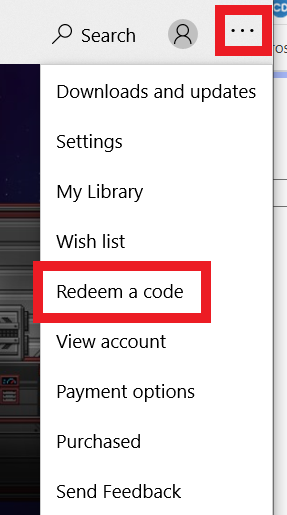
    Xbox Series X And Series S

      1. Sign in to your Xbox One (make sure you’re signed in with the Microsoft account you want to redeem the code with).
      2. Select the Microsoft Store app from your Home Screen or search for it.
      3. Scroll down to "Redeem Code" (on the left-hand side (under your account name).)
      4. Enter the 25-character code that’s displayed on the ‘Order’ page of CDKeys.com, then follow the prompts. Don’t worry about hyphens, the system takes care of those for you.

    Note If you can’t locate Store, scroll down to Add more on the Home screen and select the Store tile. (You may need to select See all suggestions.) Then select Add to Home.

    Web Browser

      1. Load a web browser and go to this address: https://redeem.microsoft.com/enter
      2. Sign in with your Microsoft account credentials.
      3. Enter your unique code that’s displayed on the ‘Order’ page of CDKeys.com and follow the prompts to activate. Don’t worry about hyphens, the system takes care of those for you.

    Windows 10

      1. Sign in to your PC (make sure you’re signed in with the Microsoft account you want to redeem the code with).
      2. Press the Start button, type store, then select Microsoft Store.
      3. Select More … > Redeem a code.
      4. Select “Redeem Code”
      5. Enter the 25-character code that’s displayed on the ‘Order’ page of CDKeys.com, then follow the prompts. Don’t worry about hyphens, the system takes care of those for you.

    Android/Windows 10 Mobile device

      1. Open the Xbox mobile app, then sign in (make sure you’re signed in with the Microsoft account you want to redeem the code with).
      2. Press the Menu button in the upper left corner.
      3. Select Microsoft Store from this list, then choose Redeem a code.
      4. Select “Redeem Code”
      5. Enter the 25-character code that’s displayed on the ‘Order’ page of CDKeys.com, then follow the prompts. Don’t worry about hyphens, the system takes care of those for you.

    iOS Mobile device

      1. Go to https://redeem.microsoft.com
      2. Enter the 25-character code that’s displayed on the ‘Order’ page of CDKeys.com, then follow the prompts. Don’t worry about hyphens, the system takes care of those for you.

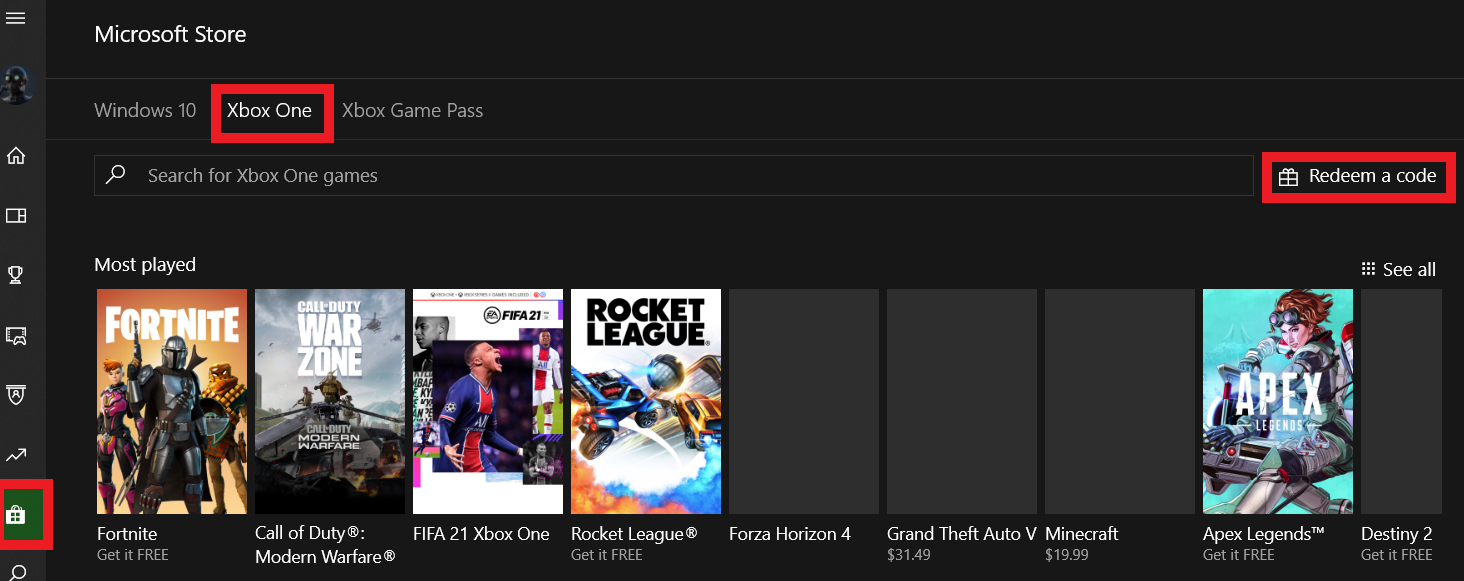
    Xbox Console Companion App on Windows 10

      1. On your PC, press the Start button , then select Xbox Console Companion from the list of apps.
      2. Make sure you're signed in with the account that you want to redeem the code with. If you need to sign in with a different account, select the Gamertag picture on the left navigation bar, then select Sign out and sign in with the correct account.
      3. Select Microsoft Store from the left navigation bar, then select Redeem a code.
      4. Enter the 25-character code that’s displayed on the ‘Order’ page of CDKeys.com, then follow the prompts. Don’t worry about hyphens, the system takes care of those for you.

    Xbox 360

      1. Sign in to your Xbox 360 (make sure you’re signed in with the Microsoft account you want to redeem the code with).
      2. Press the Xbox Guide button on your controller
      3. Select Games & Apps, then choose Redeem Code.
      4. Enter the 25-character code that’s displayed on the ‘Order’ page of CDKeys.com, then follow the prompts. Don’t worry about hyphens, the system takes care of those for you.
FFTTL is your trusted platform to buy cheap game CD keys and digital codes. Enjoy instant delivery, huge discounts, and a wide range of popular games. Shop now and save!
paypal visa mastercard
$240.37
$172.59
Buy Now