
Far Cry 5 Season Pass Xbox One
Platform
Xbox One
Release Date
27 Mar 2018
Language
English,Spanish,French,German,Italian,Portuguese,Polish,Russian
Developer
Ubisoft
Top benefit: Delivery Time 1-3 secondFully automated trading
QUANTITY
- +
Add Cart
Surprise activity: Use the coupon "ffttl" to get a 5%-35% discount,Before Discount Price : USD 221.29$
-29%
USD 310.68$
USD 221.29$
FAQ
Load More
  • Get instant download of Far Cry 5 Season Pass on Xbox One with ffttl.com

    The top 3 reasons to play Far Cry 5 Season Pass

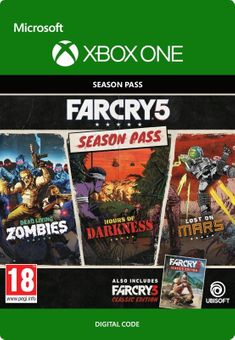
    1. The season pass lets you experience three extra adventures aside from the base game itself.
    2. Along with the season pass, you’ll get the Far Cry 3 Classic Edition game.
    3. The developers have included the season pass in the gold edition of Far Cry 5.

    What to know before buying Far Cry 5 Season Pass

    This purchase is just for the season pass and not the base game itself.

    What's included with Far Cry 5 Season Pass?

    The bundle for the season pass includes the Far Cry 3 Classic Edition game along with three adventures, which includes battles against zombies.

    Yes, you do need the base game to enjoy the season pass bundle.

    Is there any region lock for Far Cry 5 Season Pass?

    No, there is no region lock.

    How will I receive my instant download for Far Cry 5 Season Pass?

    Once the payment is posted successfully, you will receive an activation email with the product key.

    How to activate the key for Far Cry 5 Season Pass

    When you receive the activation email, you will need to go to your Xbox One console. It is important to note that you will need to have Far Cry 5 already installed on your Xbox One to activate the season pass. When you’re in the game itself, you should be able to find a category or menu where you can input the season pass key. Once you enter the key successfully, you should be able to see the season battle quests and rewards available.

    Far Cry 5 Season Pass details

    The Far Cry 5 Season Pass extends from the original story in the game. The season pass lets you experience three extra adventures that include battling zombies, Viet Cong soldiers and Martian arachnids. The season pass also lets you earn extra rewards as you progress in the game. Moreover, you can also enjoy the Far Cry 3 Classic Edition that comes with this season pass.

    Want to get a free key to play Far Cry 5 Season Pass?

    Our team regularly selects the best comments about the game. Make sure to share your feedback in the review tab!

    What are the system requirements for Far Cry 5 Season Pass?

    MINIMUM for Far Cry 5 Season Pass

    • ProcessorXbox One Enhanced
    • Graphics4K Ultra HD optional but available
    • MemoryN/A
    • Disk spaceN/A
    • SystemXbox One
    • Online MultiplayerRequires Xbox Live Gold subscription

    RECOMMENDED Far Cry 5 Season Pass

    • ProcessorXbox One Enhanced
    • Graphics4K Ultra HD optional but available
    • MemoryN/A
    • Disk spaceN/A
    • SystemXbox One
    • Online MultiplayerRequires Xbox Live Gold subscription

    Genre

    Action, Adventure, Open World
  • HOW TO REDEEM XBOX ONE GAME CODE

    Xbox One Console:

    1. Sign in to your Xbox One (make sure you’re signed in with the Microsoft account you want to redeem the code with)
    2. Press the Xbox button on the controller to open the guide, and then select Store.


    3. Press the View button on the controller to open the side menu, and then select Redeem.


    4. Enter your unique code that’s displayed on the ‘Orders’ page of CDKeys.com and select Next, and then follow the prompts.


    Web Browser:

    1. On your PC or phone’s browser, navigate to https://redeem.microsoft.com
    2. Sign in with your Microsoft account credentials (make sure you’re signed in with the Microsoft account you want to redeem the code with).
    3. Enter your unique code that’s displayed on the ‘Orders’ page of CDKeys.com and select Next, and then follow the prompts.

    Microsoft Store on Windows:

    1. On your PC, press the Start button , and then enter the store into the search bar.
    2. Choose Microsoft Store from the results to open the app and sign in with your Microsoft account credentials (make sure you’re signed in with the Microsoft account you want to redeem the code with).
    3. Select your account in the top-right corner of the screen, and then select Redeem code or gift cards.


    4. Enter your unique code that’s displayed on the ‘Orders’ page of CDKeys.com and select Next, and then follow the prompts.


    Xbox App for Windows (ONLY PC):

    1. On your PC, press the Start button , and then enter Xbox into the search bar.
    2. Choose the Xbox app from the results to open the app and sign in with your Microsoft account credentials (make sure you’re signed in with the Microsoft account you want to redeem the code with)
    3. Select your gamerpic, and then select Settings.


    4. Select Redeem under Redeem a code.


    5. Enter your unique code that’s displayed on the ‘Orders’ page of CDKeys.com and select Next and then follow the prompts.


FFTTL is your trusted platform to buy cheap game CD keys and digital codes. Enjoy instant delivery, huge discounts, and a wide range of popular games. Shop now and save!
paypal visa mastercard
$310.68
$221.29
Buy Now







