
 0
0
Get your instant download with ffttl.com
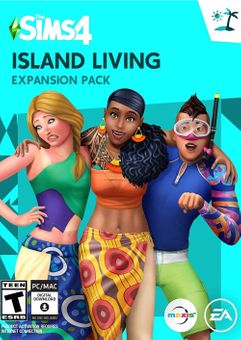
This product includes The Sims 4 - Island Living Xbox One. Base game required.
The top 3 reasons to play The Sims 4 - Island Living Xbox One
- It's time your Sims had a vacation!
- Travel to the tropical island hideaway of Sulani and watch as your Sims enjoy endless sun, sand, and fun!
- New activities, new jobs, and new experiences await in the Island Living expansion.
About The Sims 4 - Island Living Xbox One
- Island Living takes place on the island of Sulani, where your Sims can experience all the best of laid-back island living.
- From fun activities like swimming and building sandcastles to new career options like conservationist and lifeguard, there’s so much to do in this tropical hideaway.
- Experience the local culture by sampling exotic delicacies at a pit barbecue or learn all about local folklore from a friendly guide.
What are the system requirements?
- OSXbox One / Xbox X
- SubscriptionOnline multiplayer on Xbox requires Xbox Live Gold (subscription sold separately).
- OtherInternet Access
Genre
Atmospheric, Building, Casual, Fantasy, Relaxing, Simulation, Singleplayer-
HOW TO REDEEM XBOX ONE GAME CODE

Xbox One Console:
- Sign in to your Xbox One (make sure you’re signed in with the Microsoft account you want to redeem the code with)
- Press the Xbox button on the controller to open the guide, and then select Store.

- Press the View button on the controller to open the side menu, and then select Redeem.

- Enter your unique code that’s displayed on the ‘Orders’ page of CDKeys.com and select Next, and then follow the prompts.

Web Browser:
- On your PC or phone’s browser, navigate to https://redeem.microsoft.com
- Sign in with your Microsoft account credentials (make sure you’re signed in with the Microsoft account you want to redeem the code with).
- Enter your unique code that’s displayed on the ‘Orders’ page of CDKeys.com and select Next, and then follow the prompts.
Microsoft Store on Windows:
- On your PC, press the Start button , and then enter the store into the search bar.
- Choose Microsoft Store from the results to open the app and sign in with your Microsoft account credentials (make sure you’re signed in with the Microsoft account you want to redeem the code with).
- Select your account in the top-right corner of the screen, and then select Redeem code or gift cards.

- Enter your unique code that’s displayed on the ‘Orders’ page of CDKeys.com and select Next, and then follow the prompts.

Xbox App for Windows (ONLY PC):
- On your PC, press the Start button , and then enter Xbox into the search bar.
- Choose the Xbox app from the results to open the app and sign in with your Microsoft account credentials (make sure you’re signed in with the Microsoft account you want to redeem the code with)
- Select your gamerpic, and then select Settings.

- Select Redeem under Redeem a code.

- Enter your unique code that’s displayed on the ‘Orders’ page of CDKeys.com and select Next and then follow the prompts.




