
 0
0
Get your instant download with ffttl.com
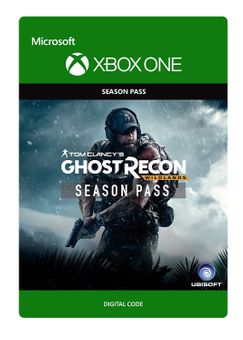
This product includes Tom Clancy’s Ghost Recon Wildlands Season Pass for Xbox One. Base game required.
The top 3 reasons to play Tom Clancy’s Ghost Recon Wildlands Season Pass
- Enhance your Ghost Recon Wildlands experience with the Season Pass.
- Get instant access to two massive expansions, equipment packs, weapon packs, and lots more. Details below!
- Compete online with 6 new Ghost War PvP classes.
About Tom Clancy’s Ghost Recon Wildlands Season Pass
- Extend your Ghost Recon experience with the season pass, which includes two major expansions, equipment packs for the campaign, and an exclusive vehicle. The season pass also grants you one week early access to 6 Ghost War PvP post-launch classes!
- The Season Pass includes:
- Narco Road: Get the full spectrum of the narco life as you tear through Bolivia using new vehicles in a series of fast-paced missions. Infiltrate various gangs and take out their leaders one by one.
- Fallen Ghosts: After your chopper is shot down during an evacuation mission, your squad will be forced to adapt as they’re tracked down by an elite group of ruthless mercenaries.
- Extra gameplay content:
- The Unidad Conspiracy missions: Destabilize the alliance between Santa Blanca and Unidad in the Media Luna province.
- Peruvian Connection Pack
- Equipment packs:
- Rebellion Ghost Pack
- Unidad Ghost Pack
- Santa Blanca Ghost Pack
- Exclusive vehicle:
- Bolivian Minibus
- 6 PvP Post Launch Classes
- Deluxe Pack
- The Huntsman rifle
- The Huntsman motorbike
- 3 emblems
- 3 weapon camo
- 3 character customization items
- XP booster
What are the system requirements?
- Xbox Live account in the corresponding region
- Internet connection for activation and online features
- Tom Clancy’s Ghost Recon Wildlands base game for Xbox One
Genre
Action, Adventure, FPS, Open World, Shooter, Tactical Shooter-
HOW TO REDEEM XBOX ONE AND XBOX SERIES X|S GAME CODE

Xbox One Console / Xbox Series X|S Console:
- Sign in to your Xbox One / Xbox Series X|S (make sure you’re signed in with the Microsoft account you want to redeem the code with)
- Press the Xbox button on the controller to open the guide, and then select Store.

- Press the View button on the controller to open the side menu, and then select Redeem.

- Enter your unique code that’s displayed on the ‘Orders’ page of CDKeys.com and select Next, and then follow the prompts.

Web Browser:
- On your PC or phone’s browser, navigate to https://redeem.microsoft.com
- Sign in with your Microsoft account credentials (make sure you’re signed in with the Microsoft account you want to redeem the code with).
- Enter your unique code that’s displayed on the ‘Orders’ page of CDKeys.com and select Next, and then follow the prompts.
Microsoft Store on Windows:
- On your PC, press the Start button , and then enter the store into the search bar.
- Choose Microsoft Store from the results to open the app and sign in with your Microsoft account credentials (make sure you’re signed in with the Microsoft account you want to redeem the code with).
- Select your account in the top-right corner of the screen, and then select Redeem code or gift cards.

- Enter your unique code that’s displayed on the ‘Orders’ page of CDKeys.com and select Next, and then follow the prompts.

Xbox App for Windows (ONLY PC):
- On your PC, press the Start button , and then enter Xbox into the search bar.
- Choose the Xbox app from the results to open the app and sign in with your Microsoft account credentials (make sure you’re signed in with the Microsoft account you want to redeem the code with)
- Select your gamerpic, and then select Settings.

- Select Redeem under Redeem a code.

- Enter your unique code that’s displayed on the ‘Orders’ page of CDKeys.com and select Next and then follow the prompts.




