
 0
0

THIS DLC INCLUDES
This content requires the base game.
- All-New Cinematic Story
- Ninja Mime Johnny Cage
- Thanks A Million Johnny Cage
- 3 New Playable Fighters - Sheeva, Fujin & guest RoboCop
- 3 New Skin Packs, to be released - Summer Heat, All Hallows ' Eve and Klassic Femme Fatale Skin Pack
ABOUT THE GAME
Req. Mortal Kombat 11. New players can buy MK11 Ultimate, which incl. MK11, Kombat Pack 1, Aftermath Expansion & Kombat Pack 2.
Experience Mortal Kombat's first-ever major expansion. Aftermath features a brand-new cinematic story centered around trust and deceit. Fire God Liu Kang, the new keeper of time and protector of Earthrealm, looks to secure the future he envisions. In order to do so, he is forced to enlist the help of some unlikely allies & familiar foes. Players will have to decide who they can trust and who they must defeat with fate on the line. Forge a new history.
What are the system requirements?
- OSXbox One / Xbox X|S / PC
- Optimised for Xbox Series X|S?No
- SubscriptionOnline multiplayer on Xbox requires Xbox Live Gold (subscription sold separately).
- OtherInternet Access
Genre
Action, Atmospheric, Fighting, Horror, Singleplayer, Story Rich, Violent, GorePlatform
Xbox/PC (EU)-
HOW TO REDEEM XBOX PLAY ANYWHERE GAME CODE

Xbox One Console / Xbox Series X|S Console:
- Sign in to your Xbox One / Xbox Series X|S (make sure you’re signed in with the Microsoft account you want to redeem the code with)
- Press the Xbox button on the controller to open the guide, and then select Store.

- Press the View button on the controller to open the side menu, and then select Redeem.

- Enter your unique code that’s displayed on the ‘Orders’ page of CDKeys.com and select Next, and then follow the prompts.

Xbox 360 Console:
- Sign in to your Xbox 360 (make sure you’re signed in with the Microsoft account you want to redeem the code with)
- Press the Guide button on your controller
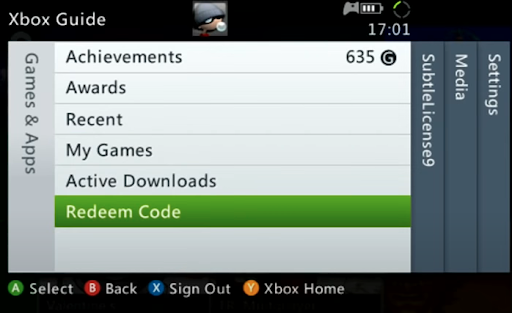
- Select Games & Apps, and then select Redeem Code.
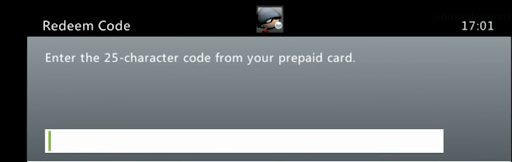
- Enter your unique code that’s displayed on the ‘Orders’ page of CDKeys.com and then follow the prompts.
Web Browser:
- On your PC or phone’s browser, navigate to https://redeem.microsoft.com
- Sign in with your Microsoft account credentials (make sure you’re signed in with the Microsoft account you want to redeem the code with).
- Enter your unique code that’s displayed on the ‘Orders’ page of CDKeys.com and select Next, and then follow the prompts.
Microsoft Store on Windows:
- On your PC, press the Start button , and then enter the store into the search bar.
- Choose Microsoft Store from the results to open the app and sign in with your Microsoft account credentials (make sure you’re signed in with the Microsoft account you want to redeem the code with).
- Select your account in the top-right corner of the screen, and then select Redeem code or gift cards.

- Enter your unique code that’s displayed on the ‘Orders’ page of CDKeys.com and select Next, and then follow the prompts.

Xbox App for Windows (ONLY PC):
- On your PC, press the Start button , and then enter Xbox into the search bar.
- Choose the Xbox app from the results to open the app and sign in with your Microsoft account credentials (make sure you’re signed in with the Microsoft account you want to redeem the code with)
- Select your gamerpic, and then select Settings.

- Select Redeem under Redeem a code.

- Enter your unique code that’s displayed on the ‘Orders’ page of CDKeys.com and select Next and then follow the prompts.




