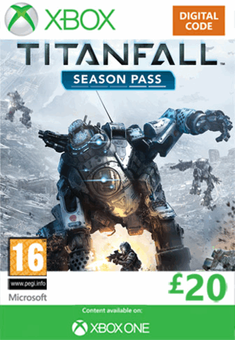
Titanfall Season Pass - Xbox Live (Xbox One/360)
Platform
Xbox Live
Release Date
14 Mar 2014
Language
English,Spanish,French,German,Italian,Portuguese,Polish,Czech,Danish,Dutch,Russian,Swedish
Developer
Respawn Entertainment
Top benefit: Delivery Time 1-3 secondFully automated trading
QUANTITY
- +
Add Cart
Surprise activity: Use the coupon "ffttl" to get a 5%-35% discount,Before Discount Price : USD 281.19$
-31%
USD 405.55$
USD 281.19$
FAQ
Load More
  • Get instant download of Titanfall Season Pass – Xbox Live on Xbox One/360 with ffttl.com

    The top 3 reasons to play Titanfall Season Pass – Xbox Live

    1. You’ll have two choices of playing as the pilot or calling your Titans and playing as a humongous robotic avatar capable of wide destruction.
    2. The season pass for Titanfall extends the game beyond its main gameplay feature with three new content packs.
    3. The developers have implemented new maps that go along with the season pass, which gives players a fresh new take on the game.

    What to know before buying Titanfall Season Pass – Xbox Live

    What's included with Titanfall Season Pass – Xbox Live?

    This is the season pass only for Titanfall, and you will need to purchase the base game separately for the season pass to work.

    Yes, you do need to buy the base game.
    Is there any region lock for Titanfall Season Pass – Xbox Live?

    No, there is no region lock.

    How will I receive my instant download for Titanfall Season Pass – Xbox Live?

    Once your payment has been submitted successfully, you will receive a confirmation email with the activation code.

    How to activate the key for Titanfall Season Pass – Xbox Live

    Once you have successfully installed the whole game on your Xbox One or Xbox 360 through the Steam platform, simply acquire the key you got from the activation email. Next, you open the game from your library and head over to the game’s main menu. In the main menu, you should be able to find a place to redeem your season pass activation key.

    Titanfall Season Pass – Xbox Live details

    The Titanfall Season Pass – Xbox Live game extends the game’s main storyline and gameplay with three new content packs. This game takes place in a futuristic world where you have two choices of playing as the pilot or the Titan robot itself. The giant Titan brings destruction to anything that lies in its path, but the pilot lets you move with ease and precision while the Titan can be clunky and difficult to maneuver. However, the Titan brings great power and abilities that can make you unstoppable in the battlefields. It is a multiplayer online game with all the ambiance of a single player match. Moreover, the season pass lets you explore new maps and content. In the first map, you can play a multi-level environment that lets you experience new defensive, offensive and strategic gameplay. The second map engages you in intense skirmishes. You’ll be able to hide behind natural rock walls and explore dig sites. The last map prepares you for close quarter combat by using ziplines and wall-running abilities. The season pass features: • Map Pack 1: Expedition – A swampland that contains large trees to provide cover for your Titans • Map Pack 2: Frontier’s Edge – The streets of a militia settlement in export • Map Pack 3: IMC Rising – A cold decommissioned IMC base under the name Zone 18 • New areas to hone your pilot and Titan skills in order to achieve better goals in the game

    Want to get a free key to play Titanfall Season Pass – Xbox Live?

    Our team regularly selects the best comments about the game. Make sure to share your feedback in the review tab!
    What are the system requirements for Titanfall Season Pass – Xbox Live?

    • Xbox Live account
    • Broadband internet connection
  • Activate with Xbox


    Xbox One

      1. Sign in to your Xbox One (make sure you’re signed in with the Microsoft account you want to redeem the code with).
      2. Press the Xbox button to open the guide, then select Home.
      3. Select Store.
      4. Select Use a code
      5. Enter the 25-character code that’s displayed on the ‘Order’ page of CDKeys.com, then follow the prompts. Don’t worry about hyphens, the system takes care of those for you.

    Note If you can’t locate Store, scroll down to Add more on the Home screen and select the Store tile. (You may need to select See all suggestions.) Then select Add to Home.
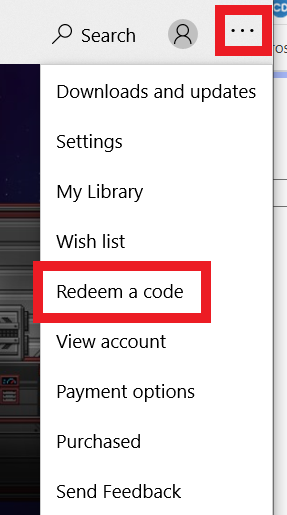
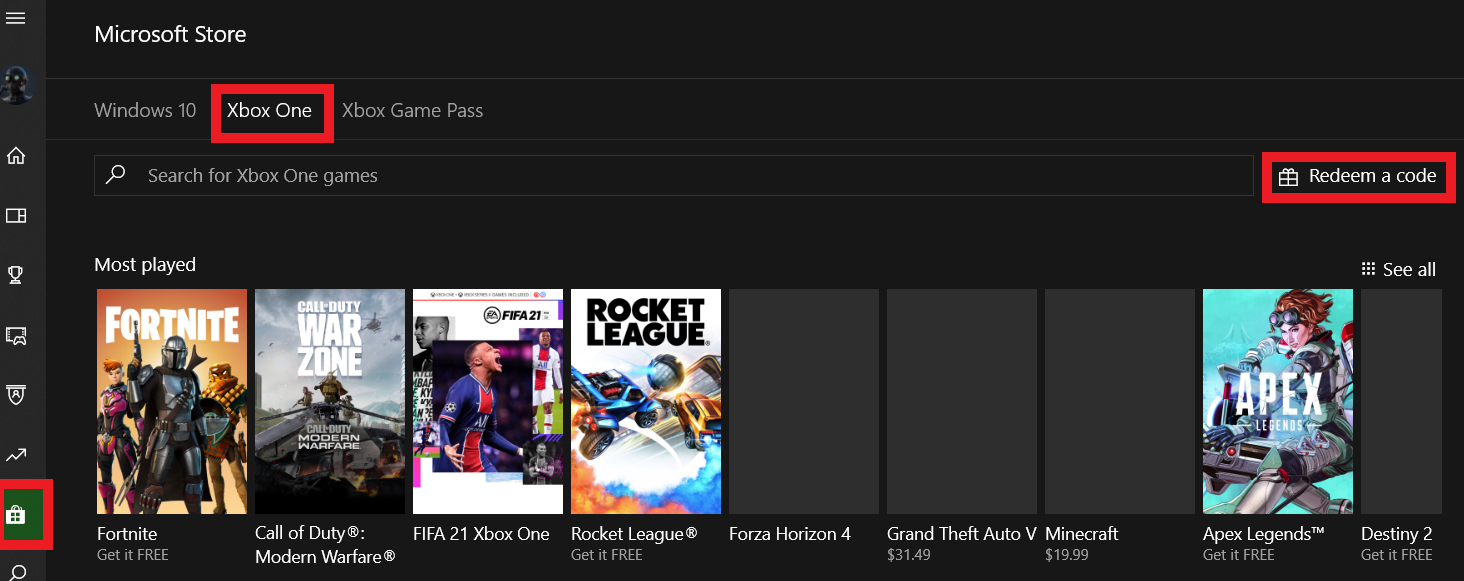
    Xbox Series X And Series S

      1. Sign in to your Xbox One (make sure you’re signed in with the Microsoft account you want to redeem the code with).
      2. Select the Microsoft Store app from your Home Screen or search for it.
      3. Scroll down to "Redeem Code" (on the left-hand side (under your account name).)
      4. Enter the 25-character code that’s displayed on the ‘Order’ page of CDKeys.com, then follow the prompts. Don’t worry about hyphens, the system takes care of those for you.

    Note If you can’t locate Store, scroll down to Add more on the Home screen and select the Store tile. (You may need to select See all suggestions.) Then select Add to Home.

    Web Browser

      1. Load a web browser and go to this address: https://redeem.microsoft.com/enter
      2. Sign in with your Microsoft account credentials.
      3. Enter your unique code that’s displayed on the ‘Order’ page of CDKeys.com and follow the prompts to activate. Don’t worry about hyphens, the system takes care of those for you.

    Windows 10

      1. Sign in to your PC (make sure you’re signed in with the Microsoft account you want to redeem the code with).
      2. Press the Start button, type store, then select Microsoft Store.
      3. Select More … > Redeem a code.
      4. Select “Redeem Code”
      5. Enter the 25-character code that’s displayed on the ‘Order’ page of CDKeys.com, then follow the prompts. Don’t worry about hyphens, the system takes care of those for you.

    Android/Windows 10 Mobile device

      1. Open the Xbox mobile app, then sign in (make sure you’re signed in with the Microsoft account you want to redeem the code with).
      2. Press the Menu button in the upper left corner.
      3. Select Microsoft Store from this list, then choose Redeem a code.
      4. Select “Redeem Code”
      5. Enter the 25-character code that’s displayed on the ‘Order’ page of CDKeys.com, then follow the prompts. Don’t worry about hyphens, the system takes care of those for you.

    iOS Mobile device

      1. Go to https://redeem.microsoft.com
      2. Enter the 25-character code that’s displayed on the ‘Order’ page of CDKeys.com, then follow the prompts. Don’t worry about hyphens, the system takes care of those for you.

    Xbox Console Companion App on Windows 10

      1. On your PC, press the Start button , then select Xbox Console Companion from the list of apps.
      2. Make sure you're signed in with the account that you want to redeem the code with. If you need to sign in with a different account, select the Gamertag picture on the left navigation bar, then select Sign out and sign in with the correct account.
      3. Select Microsoft Store from the left navigation bar, then select Redeem a code.
      4. Enter the 25-character code that’s displayed on the ‘Order’ page of CDKeys.com, then follow the prompts. Don’t worry about hyphens, the system takes care of those for you.

    Xbox 360

      1. Sign in to your Xbox 360 (make sure you’re signed in with the Microsoft account you want to redeem the code with).
      2. Press the Xbox Guide button on your controller
      3. Select Games & Apps, then choose Redeem Code.
      4. Enter the 25-character code that’s displayed on the ‘Order’ page of CDKeys.com, then follow the prompts. Don’t worry about hyphens, the system takes care of those for you.
FFTTL is your trusted platform to buy cheap game CD keys and digital codes. Enjoy instant delivery, huge discounts, and a wide range of popular games. Shop now and save!
paypal visa mastercard
$405.55
$281.19
Buy Now