GTA V 5 Whale Shark Cash Card Xbox
Platform
Xbox One
Release Date
18 Nov 2014
Language
English,Spanish,French,German,Italian,Portuguese,Polish,Czech,Danish,Dutch,Russian,Swedish
Developer
Rockstar North
Top benefit: Delivery Time 1-3 secondFully automated trading
QUANTITY
- +
Add Cart
Surprise activity: Use the coupon "ffttl" to get a 5%-35% discount,Before Discount Price : USD 419.49$
-27%
USD 576.34$
USD 419.49$
FAQ
Load More
  • Get your instant download of a Grand Theft Auto Online (GTA V 5): Whale Shark Cash Card on Xbox with ffttl.com

    The top 3 reasons to get a GTA Online Whale Shark Cash Card

    1. Cash is king when you’re in Los Santos. The Whale Shark cash card hooks you up with over 3 million dollars worth of in-game money.
    2. If you want to get the most out of GTA 5, then you need some cash-- the more the better!
    3. Save money, and enhance your GTA Online experience with the Whale Shark Card.

    What to know before buying a GTA Online Whale Shark Cash Card

    NOTE:

    • Grand Theft Auto V base game for Xbox required

    What's included with a GTA Online Whale Shark Cash Card?

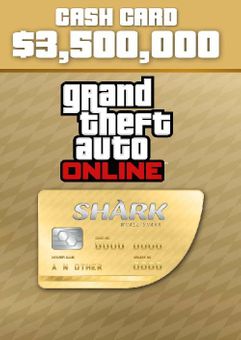
    Included is a GTA 5 Online Whale Shark Cash Card valued at 3,500,000 in-game dollars.
    Is there any region lock for this GTA Online Whale Shark Cash Card?

    No region lock; this product is available worldwide.

    How will I receive my instant download for my GTA Online Whale Shark Cash Card?

    After payment has been approved, your game key will be included in your order confirmation email. You can access your key by following a link in the email. Next, you can activate your key on its corresponding platform.

    How to activate the key for the GTA Online Whale Shark Cash Card

    Xbox Console:

    1. Load the “Home” screen (make sure you’re signed in to your Xbox Live account), and navigate right to “Store”.
    2. In “Categories”, select “Games”.
    3. Choose the “Use a code” option.
    4. Select the option to “enter the 25 character code”, and enter the code you received in your ffttl.com confirmation email.

    Web Browser

    1. Load a web browser and go to this address: https://live.xbox.com/redeemtoken
    2. Sign in with your Microsoft account credentials.
    3. Enter the game code from your email and click “Next”; follow the prompts to confirm.

    You can find additional support for your Xbox Live account here: https://support.xbox.com/en-US/contact-us

    GTA Online Whale Shark Cash Card details

    • The Whale Shark Cash Card instantly gets you $3,500,000 of GTA Online in-game money.
    • Play in single-player or with up to 30 others in Grand Theft Auto Online. Work together-- or don't! Do whatever you want, on or offline! 
    • It takes money to make money in GTA V. Give your criminal enterprise the boost it needs with the Whale Shark Cash Card and you’ll soon see more money rolling in!
    • A faster car, a new apartment, a fighter jet-- buy what you need and enhance your GTA Online experience with the included Cash Card.
    • Save money, and start your GTA Online experience right with the Whale Shark Cash Card.

    Want to get a free GTA Online Whale Shark Cash Card?

    Our team regularly selects the best comments about a game and rewards that user with a free key. Share your feedback in the review tab for a chance to win!


    What are the system requirements for Grand Theft Auto Online

    • Grand Theft Auto V base game for Xbox
    • Xbox Live account
    • Internet connection

    Platform

    Xbox (WW)
  • HOW TO REDEEM XBOX ONE GAME CODE

    Xbox One Console:

    1. Sign in to your Xbox One (make sure you’re signed in with the Microsoft account you want to redeem the code with)
    2. Press the Xbox button on the controller to open the guide, and then select Store.


    3. Press the View button on the controller to open the side menu, and then select Redeem.


    4. Enter your unique code that’s displayed on the ‘Orders’ page of CDKeys.com and select Next, and then follow the prompts.


    Web Browser:

    1. On your PC or phone’s browser, navigate to https://redeem.microsoft.com
    2. Sign in with your Microsoft account credentials (make sure you’re signed in with the Microsoft account you want to redeem the code with).
    3. Enter your unique code that’s displayed on the ‘Orders’ page of CDKeys.com and select Next, and then follow the prompts.

    Microsoft Store on Windows:

    1. On your PC, press the Start button , and then enter the store into the search bar.
    2. Choose Microsoft Store from the results to open the app and sign in with your Microsoft account credentials (make sure you’re signed in with the Microsoft account you want to redeem the code with).
    3. Select your account in the top-right corner of the screen, and then select Redeem code or gift cards.


    4. Enter your unique code that’s displayed on the ‘Orders’ page of CDKeys.com and select Next, and then follow the prompts.


    Xbox App for Windows (ONLY PC):

    1. On your PC, press the Start button , and then enter Xbox into the search bar.
    2. Choose the Xbox app from the results to open the app and sign in with your Microsoft account credentials (make sure you’re signed in with the Microsoft account you want to redeem the code with)
    3. Select your gamerpic, and then select Settings.


    4. Select Redeem under Redeem a code.


    5. Enter your unique code that’s displayed on the ‘Orders’ page of CDKeys.com and select Next and then follow the prompts.


FFTTL is your trusted platform to buy cheap game CD keys and digital codes. Enjoy instant delivery, huge discounts, and a wide range of popular games. Shop now and save!
paypal visa mastercard
$576.34
$419.49
Buy Now