
 0
0
Get your instant download with ffttl.com
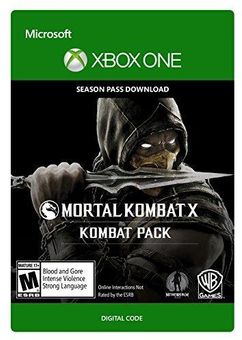
This product includes Mortal Kombat X Kombat Pack. Base game required.
The top 3 reasons to play Mortal Kombat X Kombat Pack
- Get access to four new playable characters and skin packs.
- Defeat your opponents as Jason Voorhees or play as Predator, the Ultimate Hunter.
- Enhance your Mortal Kombat X experience with this jam-packed Kombat Pack.
About Mortal Kombat X Kombat Pack
- Kombat Pack grants early access to 4 upcoming playable characters and skin packs.
- Slash your opponents as Horror Icon Jason Voorhees, or play as Predator, the Ultimate Hunter.
- Klassic characters Tanya and Tremor complete the offer.
- Each fighter comes with a themed skin pack including three new skins for select characters.
What are the system requirements?
MINIMUM
- Broadband internet connection
- Xbox Live account
- Xbox One
-
Activate with Xbox

Xbox One
- Sign in to your Xbox One (make sure you’re signed in with the Microsoft account you want to redeem the code with).
- Press the Xbox button to open the guide, then select Home.
- Select Store.
- Select Use a code
- Enter the 25-character code that’s displayed on the ‘Order’ page of CDKeys.com, then follow the prompts. Don’t worry about hyphens, the system takes care of those for you.
Note If you can’t locate Store, scroll down to Add more on the Home screen and select the Store tile. (You may need to select See all suggestions.) Then select Add to Home.
Xbox Series X And Series S
- Sign in to your Xbox One (make sure you’re signed in with the Microsoft account you want to redeem the code with).
- Select the Microsoft Store app from your Home Screen or search for it.
- Scroll down to "Redeem Code" (on the left-hand side (under your account name).)
- Enter the 25-character code that’s displayed on the ‘Order’ page of CDKeys.com, then follow the prompts. Don’t worry about hyphens, the system takes care of those for you.
Note If you can’t locate Store, scroll down to Add more on the Home screen and select the Store tile. (You may need to select See all suggestions.) Then select Add to Home.
Web Browser
- Load a web browser and go to this address: https://redeem.microsoft.com/enter
- Sign in with your Microsoft account credentials.
- Enter your unique code that’s displayed on the ‘Order’ page of CDKeys.com and follow the prompts to activate. Don’t worry about hyphens, the system takes care of those for you.
Windows 10
- Sign in to your PC (make sure you’re signed in with the Microsoft account you want to redeem the code with).
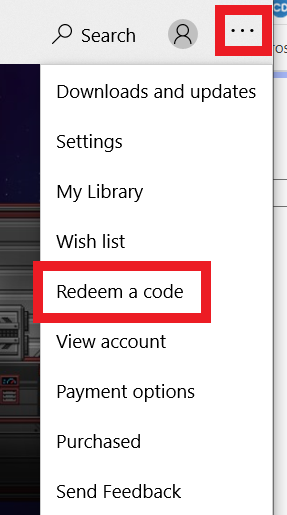
- Press the Start button, type store, then select Microsoft Store.
- Select More … > Redeem a code.
- Select “Redeem Code”
- Enter the 25-character code that’s displayed on the ‘Order’ page of CDKeys.com, then follow the prompts. Don’t worry about hyphens, the system takes care of those for you.
Android/Windows 10 Mobile device
- Open the Xbox mobile app, then sign in (make sure you’re signed in with the Microsoft account you want to redeem the code with).
- Press the Menu button in the upper left corner.
- Select Microsoft Store from this list, then choose Redeem a code.
- Select “Redeem Code”
- Enter the 25-character code that’s displayed on the ‘Order’ page of CDKeys.com, then follow the prompts. Don’t worry about hyphens, the system takes care of those for you.
iOS Mobile device
- Go to https://redeem.microsoft.com.
- Enter the 25-character code that’s displayed on the ‘Order’ page of CDKeys.com, then follow the prompts. Don’t worry about hyphens, the system takes care of those for you.
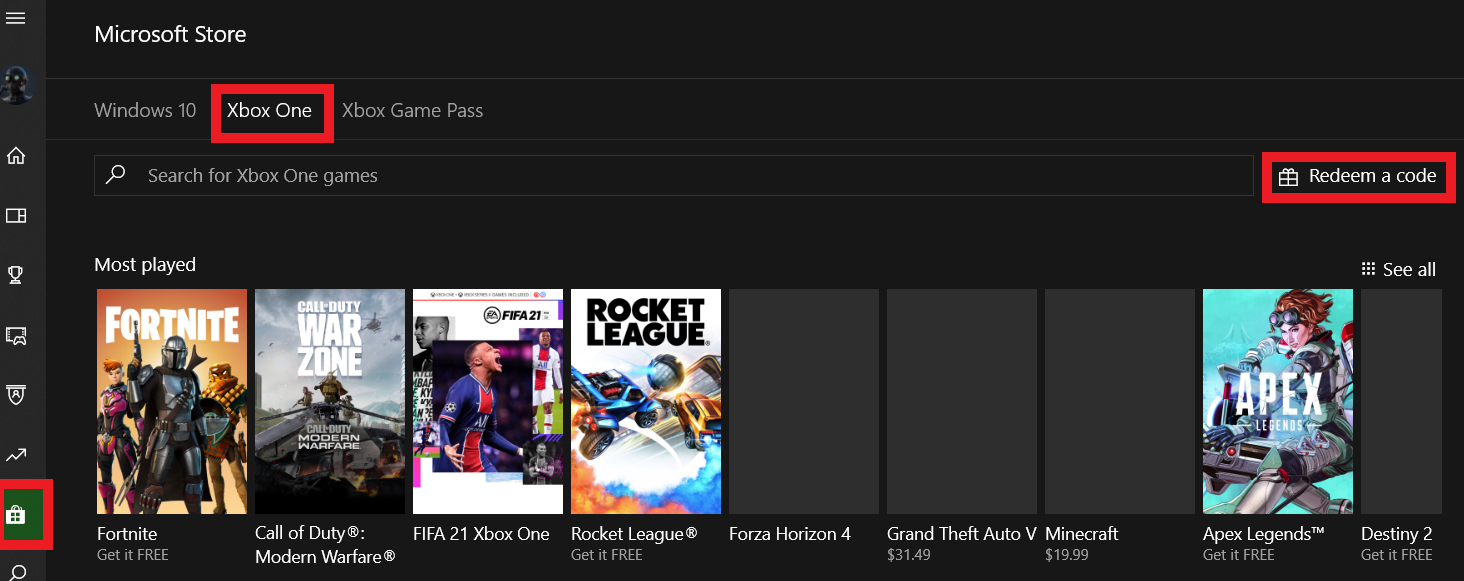
Xbox Console Companion App on Windows 10
- On your PC, press the Start button , then select Xbox Console Companion from the list of apps.
- Make sure you're signed in with the account that you want to redeem the code with. If you need to sign in with a different account, select the Gamertag picture on the left navigation bar, then select Sign out and sign in with the correct account.
- Select Microsoft Store from the left navigation bar, then select Redeem a code.
- Enter the 25-character code that’s displayed on the ‘Order’ page of CDKeys.com, then follow the prompts. Don’t worry about hyphens, the system takes care of those for you.
Xbox 360
- Sign in to your Xbox 360 (make sure you’re signed in with the Microsoft account you want to redeem the code with).
- Press the Xbox Guide button on your controller
- Select Games & Apps, then choose Redeem Code.
- Enter the 25-character code that’s displayed on the ‘Order’ page of CDKeys.com, then follow the prompts. Don’t worry about hyphens, the system takes care of those for you.



