
 0
0
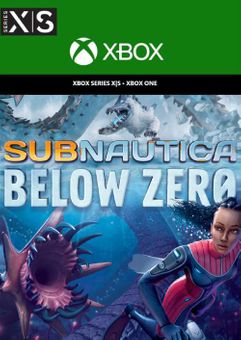






Get your instant download with ffttl.com
This product includes Subnautica: Below Zero
The top 3 reasons to play Subnautica: Below Zero
- Swim beneath the blue-lit, arching expanses of Twisty Bridges. Become mesmerized by the glittering, mammoth crystals of the Crystal Caverns.
- Clamber up snow covered peaks and venture into the icy caves of Glacial Basin.
- Maneuver between erupting Thermal Vents to discover ancient alien artifacts. Below Zero presents entirely new environments for you to survive, study, and explore.
About Subnautica: Below Zero
- Below Zero is an underwater adventure game set on an alien ocean world. It is a new chapter in the Subnautica universe, and is developed by Unknown Worlds
- Return to Planet 4546B - Submerge yourself in an all-new, sub-zero expedition in an arctic region of Planet 4546B. Arriving with little more than your wits and some survival equipment, you set out to investigate what happened to your sister...
- Uncover the Truth - Alterra left in a hurry after a mysterious incident. Abandoned research stations dot the region. What happened to the scientists who lived and worked here? Logs, items, and databanks scattered among the debris paint a new picture of the incident. With limited resources, you must improvise to survive on your own.
- Construct Habitats and Vehicles - Survive the harsh climate by constructing extensive habitats, scavenging for resources, and crafting equipment. Blast across the snowy tundra on a Snowfox hoverbike. Cruise through enchanting and perilous biomes in your modular Seatruck.
- Research Alien Lifeforms - Something undiscovered lurks around every corner. Swim through the giant Titan Holefish, encounter the haunting Shadow Leviathan, and visit the adorable Pengwings. Keep your wits about you. Not all creatures in this strange world are friendly
- Survive the Chilly Temperatures - Jump in, the water’s warm. The below zero temperatures of this arctic region pose a new threat. New weather conditions blanket above-ground habitats. Craft a toasty cold suit, sip on piping hot coffee, and warm up next to Thermal Lilies to stave off the chill.
- An Ocean of Intrigue - What really happened to your sister? Who were the aliens who came here before? Why were they on this planet? Can we find solace from grief in truth? Below Zero extends the story of the Subnautica universe, diving deep into the mystery introduced in the original game.
What are the system requirements?
- OSXbox One / Xbox X
- SubscriptionOnline multiplayer on Xbox requires Xbox Live Gold (subscription sold separately).
- OtherInternet Access
Genre
Adventure, Atmospheric, Great Soundtrack, Horror, Open World, Sci-fi, SurvivalPlatform
Xbox (UK)-
HOW TO REDEEM XBOX PLAY ANYWHERE GAME CODE

Xbox One Console / Xbox Series X|S Console:
- Sign in to your Xbox One / Xbox Series X|S (make sure you’re signed in with the Microsoft account you want to redeem the code with)
- Press the Xbox button on the controller to open the guide, and then select Store.

- Press the View button on the controller to open the side menu, and then select Redeem.

- Enter your unique code that’s displayed on the ‘Orders’ page of CDKeys.com and select Next, and then follow the prompts.

Xbox 360 Console:
- Sign in to your Xbox 360 (make sure you’re signed in with the Microsoft account you want to redeem the code with)
- Press the Guide button on your controller
- Select Games & Apps, and then select Redeem Code.
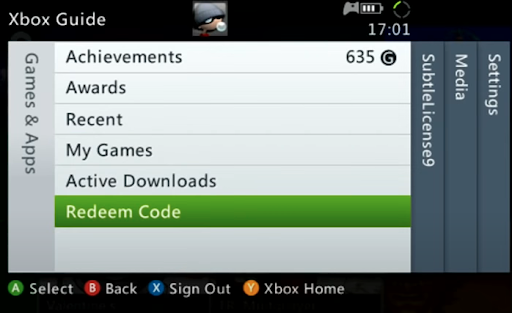
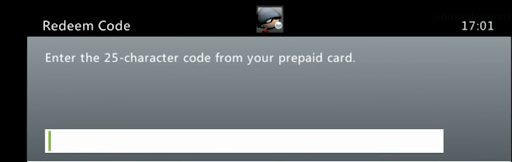
- Enter your unique code that’s displayed on the ‘Orders’ page of CDKeys.com and then follow the prompts.
Web Browser:
- On your PC or phone’s browser, navigate to https://redeem.microsoft.com
- Sign in with your Microsoft account credentials (make sure you’re signed in with the Microsoft account you want to redeem the code with).
- Enter your unique code that’s displayed on the ‘Orders’ page of CDKeys.com and select Next, and then follow the prompts.
Microsoft Store on Windows:
- On your PC, press the Start button , and then enter the store into the search bar.
- Choose Microsoft Store from the results to open the app and sign in with your Microsoft account credentials (make sure you’re signed in with the Microsoft account you want to redeem the code with).
- Select your account in the top-right corner of the screen, and then select Redeem code or gift cards.

- Enter your unique code that’s displayed on the ‘Orders’ page of CDKeys.com and select Next, and then follow the prompts.

Xbox App for Windows (ONLY PC):
- On your PC, press the Start button , and then enter Xbox into the search bar.
- Choose the Xbox app from the results to open the app and sign in with your Microsoft account credentials (make sure you’re signed in with the Microsoft account you want to redeem the code with)
- Select your gamerpic, and then select Settings.

- Select Redeem under Redeem a code.

- Enter your unique code that’s displayed on the ‘Orders’ page of CDKeys.com and select Next and then follow the prompts.




