
 0
0






Get your instant download with ffttl.com
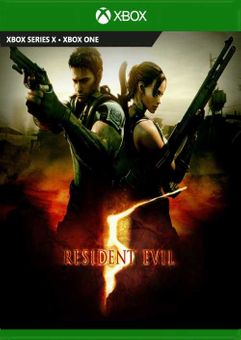
This product includes Resident Evil 5 Xbox (UK).
The top 3 reasons to play Resident Evil 5 Xbox (UK)
- One of the most popular Resident Evil titles comes to Xbox in full 1080p HD with an increased frame rate.
- Features single-player and co-op modes and a dramatic storyline.
- The Mercenaries and The Mercenaries Reunion for an even more intense experience.
About Resident Evil 5 Xbox (UK)
- One of the most popular Resident Evil titles comes to Xbox in full 1080p HD with an increased frame rate.
- Featuring single-player and co-op modes and a dramatic storyline, this fully-loaded release includes all previously released DLC (Lost in Nightmares and Desperate Escape story expansions, Versus mode, extra figures and 4 costumes), and the previously PC-exclusive No Mercy mode, as well as the new mode “The Mercenaries United” which combines the two fan-favourite modes, The Mercenaries and The Mercenaries Reunion for an even more intense experience.
What are the system requirements?
- OSXbox One / Xbox Series X|S
- SubscriptionOnline multiplayer on Xbox requires Xbox Live Gold (subscription sold separately).
- OtherInternet Access
Genre
Action, Adventure, Atmospheric, Multiplayer, Shooter, Singleplayer, SurvivalPlatform
Xbox (UK)-
HOW TO REDEEM XBOX ONE GAME CODE

Xbox One Console:
- Sign in to your Xbox One (make sure you’re signed in with the Microsoft account you want to redeem the code with)
- Press the Xbox button on the controller to open the guide, and then select Store.

- Press the View button on the controller to open the side menu, and then select Redeem.

- Enter your unique code that’s displayed on the ‘Orders’ page of CDKeys.com and select Next, and then follow the prompts.

Web Browser:
- On your PC or phone’s browser, navigate to https://redeem.microsoft.com
- Sign in with your Microsoft account credentials (make sure you’re signed in with the Microsoft account you want to redeem the code with).
- Enter your unique code that’s displayed on the ‘Orders’ page of CDKeys.com and select Next, and then follow the prompts.
Microsoft Store on Windows:
- On your PC, press the Start button , and then enter the store into the search bar.
- Choose Microsoft Store from the results to open the app and sign in with your Microsoft account credentials (make sure you’re signed in with the Microsoft account you want to redeem the code with).
- Select your account in the top-right corner of the screen, and then select Redeem code or gift cards.

- Enter your unique code that’s displayed on the ‘Orders’ page of CDKeys.com and select Next, and then follow the prompts.

Xbox App for Windows (ONLY PC):
- On your PC, press the Start button , and then enter Xbox into the search bar.
- Choose the Xbox app from the results to open the app and sign in with your Microsoft account credentials (make sure you’re signed in with the Microsoft account you want to redeem the code with)
- Select your gamerpic, and then select Settings.

- Select Redeem under Redeem a code.

- Enter your unique code that’s displayed on the ‘Orders’ page of CDKeys.com and select Next and then follow the prompts.




