
 0
0
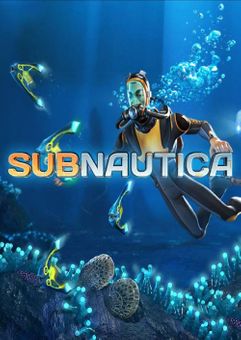






Get your instant download with ffttl.com
This product includes Subnautica Xbox One & Xbox Series X|S (EU).
The top 3 reasons to play Subnautica Xbox One & Xbox Series X|S (EU)
- You have crash-landed on an alien ocean world, and the only way to go is down.
- Build bases on the sea floor. Choose layouts and components, and manage hull-integrity as depth and pressure increase.
- Use your base to store resources, park vehicles, and replenish oxygen supplies as you explore the vast ocean.
About Subnautica Xbox One & Xbox Series X|S (EU)
- You have crash-landed on an alien ocean world, and the only way to go is down. Subnautica's oceans range from sun drenched shallow coral reefs to treacherous deep-sea trenches, lava fields, and bio-luminescent underwater rivers.
- Manage your oxygen supply as you explore kelp forests, plateaus, reefs, and winding cave systems. The water teems with life: Some of it helpful, much of it harmful.
- After crash landing in your Life Pod, the clock is ticking to find water, food, and to develop the equipment you need to explore.
- Collect resources from the ocean around you. Craft knives, lights, diving gear, and personal water craft. Venture deeper and further form to find rarer resources, allowing you to craft more advanced items.
- Build bases on the sea floor. Choose layouts and components, and manage hull-integrity as depth and pressure increase. Use your base to store resources, park vehicles, and replenish oxygen supplies as you explore the vast ocean.
What are the system requirements?
- OSXbox One / Xbox X
- SubscriptionOnline multiplayer on Xbox requires Xbox Live Gold (subscription sold separately).
- OtherInternet Access
Genre
Action, Adventure, Indie, Multiplayer, Open World, Sci-fi, SingleplayerPlatform
Xbox (EU)-
HOW TO REDEEM XBOX PLAY ANYWHERE GAME CODE

Xbox One Console / Xbox Series X|S Console:
- Sign in to your Xbox One / Xbox Series X|S (make sure you’re signed in with the Microsoft account you want to redeem the code with)
- Press the Xbox button on the controller to open the guide, and then select Store.

- Press the View button on the controller to open the side menu, and then select Redeem.

- Enter your unique code that’s displayed on the ‘Orders’ page of CDKeys.com and select Next, and then follow the prompts.

Xbox 360 Console:
- Sign in to your Xbox 360 (make sure you’re signed in with the Microsoft account you want to redeem the code with)
- Press the Guide button on your controller
- Select Games & Apps, and then select Redeem Code.
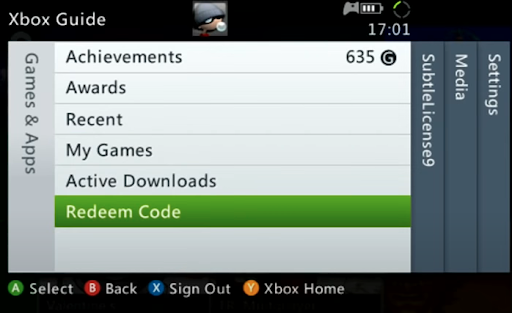
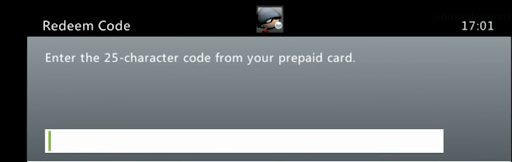
- Enter your unique code that’s displayed on the ‘Orders’ page of CDKeys.com and then follow the prompts.
Web Browser:
- On your PC or phone’s browser, navigate to https://redeem.microsoft.com
- Sign in with your Microsoft account credentials (make sure you’re signed in with the Microsoft account you want to redeem the code with).
- Enter your unique code that’s displayed on the ‘Orders’ page of CDKeys.com and select Next, and then follow the prompts.
Microsoft Store on Windows:
- On your PC, press the Start button , and then enter the store into the search bar.
- Choose Microsoft Store from the results to open the app and sign in with your Microsoft account credentials (make sure you’re signed in with the Microsoft account you want to redeem the code with).
- Select your account in the top-right corner of the screen, and then select Redeem code or gift cards.

- Enter your unique code that’s displayed on the ‘Orders’ page of CDKeys.com and select Next, and then follow the prompts.

Xbox App for Windows (ONLY PC):
- On your PC, press the Start button , and then enter Xbox into the search bar.
- Choose the Xbox app from the results to open the app and sign in with your Microsoft account credentials (make sure you’re signed in with the Microsoft account you want to redeem the code with)
- Select your gamerpic, and then select Settings.

- Select Redeem under Redeem a code.

- Enter your unique code that’s displayed on the ‘Orders’ page of CDKeys.com and select Next and then follow the prompts.




