
 0
0






Get your instant download with ffttl.com
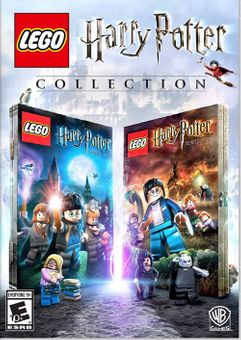
This product includes LEGO Harry Potter Collection Xbox One (UK).
The top 3 reasons to play LEGO Harry Potter Collection Xbox One (UK)
- The LEGO Harry Potter Collection brings LEGO Harry Potter: Years 1-4 and LEGO Harry Potter: Years 5-7 with both top-selling video games remastered!
- This compilation unites the creative prowess of LEGO and the expansive world of Harry Potter, with an exciting journey full of spell-casting, potion-making, puzzle-solving, lessons, duelling and much more for players of all ages to enjoy.
- Explore new locations, including Grimmauld Place, the Ministry of Magic, and Godric's Hollow
About LEGO Harry Potter Collection Xbox One (UK)
- The LEGO Harry Potter Collection brings LEGO Harry Potter: Years 1-4 and LEGO Harry Potter: Years 5-7 remastered! This compilation unites the creative prowess of LEGO and the expansive world of Harry Potter, with an exciting journey full of spell-casting, potion-making, puzzle-solving, lessons, duelling and much more for players of all ages to enjoy.
What are the system requirements?
- Xbox Live Account
- Internet Access
Genre
LEGOPlatform
Xbox (UK)-
HOW TO REDEEM XBOX ONE AND XBOX SERIES X|S GAME CODE

Xbox One Console / Xbox Series X|S Console:
- Sign in to your Xbox One / Xbox Series X|S (make sure you’re signed in with the Microsoft account you want to redeem the code with)
- Press the Xbox button on the controller to open the guide, and then select Store.

- Press the View button on the controller to open the side menu, and then select Redeem.

- Enter your unique code that’s displayed on the ‘Orders’ page of CDKeys.com and select Next, and then follow the prompts.

Web Browser:
- On your PC or phone’s browser, navigate to https://redeem.microsoft.com
- Sign in with your Microsoft account credentials (make sure you’re signed in with the Microsoft account you want to redeem the code with).
- Enter your unique code that’s displayed on the ‘Orders’ page of CDKeys.com and select Next, and then follow the prompts.
Microsoft Store on Windows:
- On your PC, press the Start button , and then enter the store into the search bar.
- Choose Microsoft Store from the results to open the app and sign in with your Microsoft account credentials (make sure you’re signed in with the Microsoft account you want to redeem the code with).
- Select your account in the top-right corner of the screen, and then select Redeem code or gift cards.

- Enter your unique code that’s displayed on the ‘Orders’ page of CDKeys.com and select Next, and then follow the prompts.

Xbox App for Windows (ONLY PC):
- On your PC, press the Start button , and then enter Xbox into the search bar.
- Choose the Xbox app from the results to open the app and sign in with your Microsoft account credentials (make sure you’re signed in with the Microsoft account you want to redeem the code with)
- Select your gamerpic, and then select Settings.

- Select Redeem under Redeem a code.

- Enter your unique code that’s displayed on the ‘Orders’ page of CDKeys.com and select Next and then follow the prompts.




