
 0
0
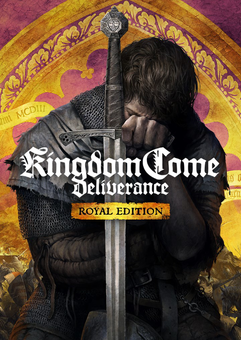






THIS EDITION INCLUDES
- Base Game
- All released DLCs:
- Treasures of the Past
- From the Ashes
- The Amorous Adventures of Bold Sir Hans Capon
- Band of Bastards
- A Woman's Lot.
ABOUT THE GAME
You're Henry, the son of a blacksmith. Thrust into a raging civil war, you watch helplessly as invaders storm your village and slaughter your friends and family. Narrowly escaping the brutal attack, you grab your sword to fight back. Avenge the death of your parents and help repel the invading forces!
FEATURES
- Challenging combat: Distance, stealth, or melee. Choose your weapons and execute dozens of combos in battles that are as thrilling as they are merciless
- Massive realistic open world: Majestic castles, vast fields, all rendered in stunning high-end graphics
- Non-linear story: Solve quests in multiple ways, then face the consequences of your decisions
- Character development: Choose your equipment, improve your skills and earn new perks
- Dynamic world: Your actions influence the reactions of the people around you. Fight, steal, seduce, threaten, persuade, or bribe.
- Historical accuracy: Meet real historical characters and experience the genuine look and feel of medieval Bohemia
What are the system requirements?
- OSXbox One / Xbox X|S
- Optimised for Xbox Series X|S?No
- SubscriptionOnline multiplayer on Xbox requires Xbox Live Gold (subscription sold separately).
- OtherInternet Access
Genre
Action, Adventure, Atmospheric, Indie, Open World, Realistic, RPG, Singleplayer, Story Rich, Historical, First-PersonPlatform
Xbox (WW)-
HOW TO REDEEM XBOX ONE GAME CODE

Xbox One Console:
- Sign in to your Xbox One (make sure you’re signed in with the Microsoft account you want to redeem the code with)
- Press the Xbox button on the controller to open the guide, and then select Store.

- Press the View button on the controller to open the side menu, and then select Redeem.

- Enter your unique code that’s displayed on the ‘Orders’ page of CDKeys.com and select Next, and then follow the prompts.

Web Browser:
- On your PC or phone’s browser, navigate to https://redeem.microsoft.com
- Sign in with your Microsoft account credentials (make sure you’re signed in with the Microsoft account you want to redeem the code with).
- Enter your unique code that’s displayed on the ‘Orders’ page of CDKeys.com and select Next, and then follow the prompts.
Microsoft Store on Windows:
- On your PC, press the Start button , and then enter the store into the search bar.
- Choose Microsoft Store from the results to open the app and sign in with your Microsoft account credentials (make sure you’re signed in with the Microsoft account you want to redeem the code with).
- Select your account in the top-right corner of the screen, and then select Redeem code or gift cards.

- Enter your unique code that’s displayed on the ‘Orders’ page of CDKeys.com and select Next, and then follow the prompts.

Xbox App for Windows (ONLY PC):
- On your PC, press the Start button , and then enter Xbox into the search bar.
- Choose the Xbox app from the results to open the app and sign in with your Microsoft account credentials (make sure you’re signed in with the Microsoft account you want to redeem the code with)
- Select your gamerpic, and then select Settings.

- Select Redeem under Redeem a code.

- Enter your unique code that’s displayed on the ‘Orders’ page of CDKeys.com and select Next and then follow the prompts.




