
 0
0







About GUILD WARS 2 2000 GEM POINTS CARD (Base game required)
- Use gems your Gem Points Card in Guild Wars 2 to buy hundreds of different in-game items from the Gem Store.
- Trade gems to other players in exchange for gold at the Trading Post!
- Let yourself be sucked into a fantastic world, full of magic, epic quests, and exciting adventures.
- Visit the Gem Store and stand out against the other players!
- Spend Guild Wars 2: 2000 Gems provided by the gamecard however you like! Buy new cosmetics, boosters and many more!
What are the system requirements?
MINIMUM
- OSWindows® 7 or better (64 bit only)
- ProcessorIntel®i3 3.4 GHz / AMD Athlon x4 3.8 GHz or better
- Memory8 GB
- GraphicsNVIDIA® GeForce® GTX 680 / AMD Radeon HD 7970 / Intel Iris 600 series
- Storage55 GB
Platform
PC (WW)-
Activate with ArenaNet:

- In a web browser, head to:https://account.arena.net/login
- Register a new account or log in to the account where you would like to redeem your code
- Click the “Redeem a Code” button on the “Overview” page, enter your unique code that’s displayed on the ‘Order’ page of CDKeys.com, then hit Submit.

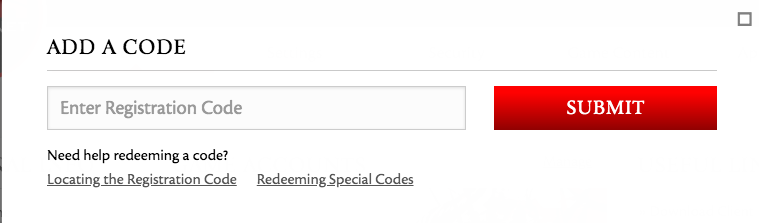
ACTIVATE GEMS WITH ARENA
- Create/login to Guild Wars 2 with the account where you want to unlock gems.
- Open the Black Lion Trading Company panel. You can also click the lion icon in the upper left corner of the game screen.
- Click the "Redeem Code" link in the upper left corner of the Store homepage.
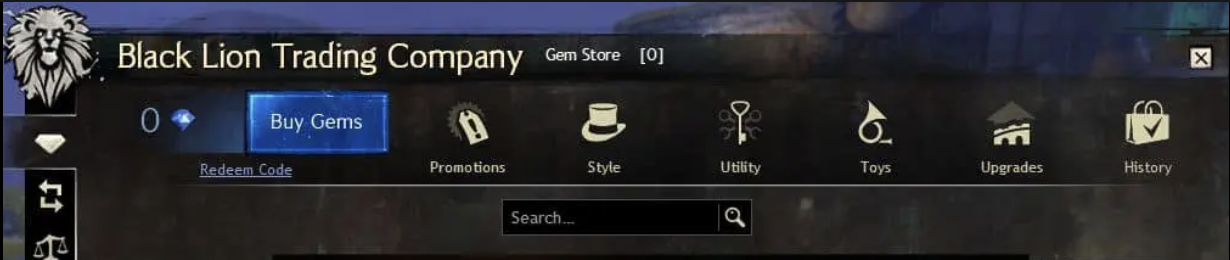
- Enter your unique code that’s displayed on the ‘Orders’ page of CDKeys.com into the field that reads: "Please enter your Gem code"
- Click Redeem.



