Rocket League PC - Proteus DLC
Platform
Steam
Release Date
04 Oct 2016
Language
English,Spanish,French,German,Italian,Portuguese,Dutch,Japanese,Korean,Russian
Developer
Psyonix
Top benefit: Delivery Time 1-3 secondFully automated trading
QUANTITY
- +
Add Cart
Surprise activity: Use the coupon "ffttl" to get a 5%-35% discount,Before Discount Price : USD 98.29$
-30%
USD 140.78$
USD 98.29$
FAQ
Load More
  • NOTE: This content requires the base game Rocket League in order to play.

    Get instant download of Rocket League - Proteus on PC with ffttl.com

    The top 3 reasons to play Rocket League - Proteus

    1. Enjoy Rocket League, a fusion of soccer and racing, packed with fluid action and thrilling competition.
    2. Join the competition with Proteus, a formidable deep-sea diver.
    3. Winner of more than 150 “Game of the Year” awards, Rocket League is sure to satisfy your competitive thirst.

    What to know before buying Rocket League - Proteus

    What's included with Rocket League - Proteus?

    Included is the DLC Rocket League - Proteus for PC.

    Is there any region lock for Rocket League - Proteus?

    This product is available worldwide; no region lock.

    How will I receive my instant download for Rocket League - Proteus?

    After payment has been approved, your game key will be included in your order confirmation email. You can access your key by following a link in the email. Next, you can activate your key on its corresponding platform.

    If you’ve pre-ordered a game, your key will be delivered to your email a day before the official (or early access) release date. You will also receive a notification via email when your key becomes available.

    How to activate the key for Rocket League - Proteus

    Activate with Steam:

    • Download and install the Steam client on your PC (https://store.steampowered.com/about/), then sign up and log in.
    • Locate the Steam key in your ffttl.com confirmation email, and copy it to your clipboard by pressing “Ctrl+C”.
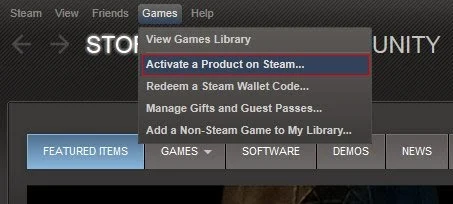
    • Open the Steam client and locate the “+ ADD A GAME...” button on the bottom left of the window. Click this and choose the “Activate a Product on Steam…” option.
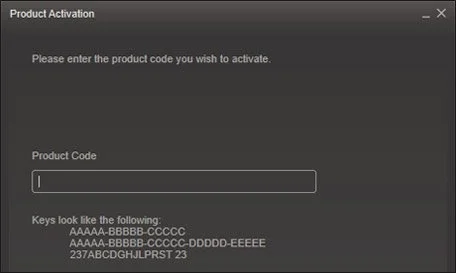
    • Paste the key from your clipboard in the “Product Code” section when asked, and follow the rest of the prompts to add the game to your library.
    • Your game is now viewable in the “Library” tab, and is available to download/install when you’re ready!

    You can find additional support for the Steam client here: https://help.steampowered.com/en/wizard/HelpWithSteam

    Rocket League - Proteus details

    • Enjoy the thrilling fusion of driving and football in this highly addictive arena classic.
    • Rocket League features a full single player experience with Season Mode.
    • In Rocket League, you'll experience intense multiplayer action both online and locally with splitscreen.
    • A massive amount of unlockable vehicles and items are available in Rocket League, along with trillions of Battle-Car customisation options.

    Want to get a free key to play Rocket League - Proteus?

    Our team regularly select the best comments about the game. Make sure to share your feedback in the review tab!

    What are the system requirements for Rocket League - Proteus?

    MINIMUM for Rocket League - Proteus

    • Processor2.4 GHz Dual core
    • GraphicsNVIDIA GTX 260 or ATI 4850
    • Memory2 GB RAM
    • Disk space7 GB
    • SystemWindows 7 or Newer
    • DirectXVersion 9.0c
    • NetworkBroadband internet connection

    RECOMMENDED for Rocket League - Proteus

    • Processor2.5+ GHz Quad core
    • GraphicsNVIDIA GTX 660 or better, ATI 7950 or better
    • Memory4 GB RAM
    • Disk space7 GB
    • SystemWindows 7 or Newer
    • DirectXVersion 9.0c
    • NetworkBroadband internet connection
    • Additional notesGamepad or Controller Recommended

    Genre

    Action, Indie, Racing, Sports
  • Activate with Steam:


    1. Download and install the Steam client on your PC.
    2. Open the Steam client, login and locate the Games tab on the top menu. Click this and then select “Activate a Product on Steam…”
    3. Enter your unique code that's displayed on the 'Orders' page of CDKeys.com and follow the prompts to activate.
    4. Your game is now viewable in the “Library” tab and is available to download/install when you’re ready.
      You can find additional support for the Steam client here: https://help.steampowered.com/en/wizard/HelpWithSteam
FFTTL is your trusted platform to buy cheap game CD keys and digital codes. Enjoy instant delivery, huge discounts, and a wide range of popular games. Shop now and save!
paypal visa mastercard
$140.78
$98.29
Buy Now