Cities: Skylines PC - Mass Transit DLC
Platform
Steam
Release Date
18 May 2017
Language
English,Spanish,French,German,Italian,Portuguese,Polish,Czech,Danish,Dutch,Russian,Swedish
Developer
Paradox Development Studio
Top benefit: Delivery Time 1-3 secondFully automated trading
QUANTITY
- +
Add Cart
Surprise activity: Use the coupon "ffttl" to get a 5%-35% discount,Before Discount Price : USD 138.49$
-33%
USD 207.04$
USD 138.49$
FAQ
Load More
  • NOTE: This content requires the base game Cities: Skylines in order to play.

    Get instant download of Cities: Skylines Mass Transit on PC with ffttl.com

    The top 3 reasons to play Cities: Skylines Mass Transit

    1. Give your commuters more style in their travel time in Cities: Skylines Mass Transit.
    2. Experience breathtaking views as your commuters travel on ferries, monorails and more.
    3. Cities: Skylines is the award-winning city-building game from Colossal Order.

    What to know before buying Cities: Skylines Mass Transit

    What's included with Cities: Skylines Mass Transit?

    Included is the Cities: Skylines Mass Transit expansion for PC.

    Is there any region lock for Cities: Skylines Mass Transit?

    This product is available worldwide; no region lock.

    How will I receive my instant download for Cities: Skylines Mass Transit?

    After payment has been approved, your game key will be included in your order confirmation email. You can access your key by following a link in the email. Next, you can activate your key on its corresponding platform.

    If you’ve pre-ordered a game, your key will be delivered to your email a day before the official (or early access) release date. You will also receive a notification via email when your key becomes available.

    How to activate the key for Cities: Skylines Mass Transit

    Activate with Steam:

    • Download and install the Steam client on your PC (https://store.steampowered.com/about/), then sign up and log in.
    • Locate the Steam key in your ffttl.com confirmation email, and copy it to your clipboard by pressing “Ctrl+C”.
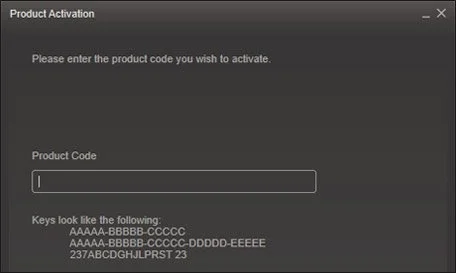
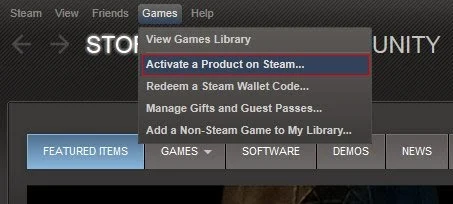
    • Open the Steam client and locate the “+ ADD A GAME...” button on the bottom left of the window. Click this and choose the “Activate a Product on Steam…” option.
    • Paste the key from your clipboard in the “Product Code” section when asked, and follow the rest of the prompts to add the game to your library.
    • Your game is now viewable in the “Library” tab, and is available to download/install when you’re ready!

    You can find additional support for the Steam client here: https://help.steampowered.com/en/wizard/HelpWithSteam

    Cities: Skylines Mass Transit details

    • Give your commuters variety as they travel on ferries, blimps, cable cars and more.
    • Enjoy new mass transit hubs bringing all of your transport services together. Give your commuters the efficiency they deserve.
    • Challenge yourself with in-game scenarios and put your traffic control skills to the test.
    • Enjoy new road types, bridges and canals for more customisation.
    • Enjoy new hats for Chirper!

    Want to get a free key to play Cities: Skylines Mass Transit?

    Our team regularly select the best comments about the game. Make sure to share your feedback in the review tab!

    What are the system requirements for Cities: Skylines Mass Transit?

    MINIMUM for Cities: Skylines Mass Transit

    • ProcessorIntel Core 2 Duo, 3.0GHz or AMD Athlon 64 X2 6400+, 3.2GHz
    • GraphicsnVIDIA GeForce GTX 260, 512 MB or ATI Radeon HD 5670, 512 MB (Does not support Intel Integrated Graphics Cards)
    • Memory4 GB RAM
    • Disk space4 GB
    • SystemMicrosoft Windows XP/Vista/7/8/8.1 (64-bit)
    • DirectXVersion 9.0c
    • NetworkBroadband internet connection

    RECOMMENDED for Cities: Skylines Mass Transit

    • ProcessorIntel Core i5-3470, 3.20GHz or AMD FX-6300, 3.5Ghz
    • GraphicsnVIDIA GeForce GTX 660, 2 GB or AMD Radeon HD 7870, 2 GB (Does not support Intel Integrated Graphics Cards)
    • Memory6 GB RAM
    • Disk space4 GB
    • SystemMicrosoft Windows 7/8 (64-bit)
    • DirectXVersion 11
    • NetworkBroadband internet connection

    Genre

    Simulation, Strategy

    Platform

    PC (WW)
  • Activate with Steam:


    1. Download and install the Steam client on your PC.
    2. Open the Steam client, login and locate the Games tab on the top menu. Click this and then select “Activate a Product on Steam…”
    3. Enter your unique code that's displayed on the 'Orders' page of CDKeys.com and follow the prompts to activate.
    4. Your game is now viewable in the “Library” tab and is available to download/install when you’re ready.
      You can find additional support for the Steam client here: https://help.steampowered.com/en/wizard/HelpWithSteam
FFTTL is your trusted platform to buy cheap game CD keys and digital codes. Enjoy instant delivery, huge discounts, and a wide range of popular games. Shop now and save!
paypal visa mastercard
$207.04
$138.49
Buy Now