
 0
0






Get your instant download with ffttl.com
This product includes Stellaris: Synthetic Dawn PC - DLC. Base game required.
The top 3 reasons to play Stellaris: Synthetic Dawn PC - DLC
- Play Stellaris as a customized robotic civilization, complete a series of robotic portraits for science robots, worker robots, and more
- Follow new event chains and story features to lead your robot race to greatness as an intergalactic AI empire; pursue mechanical perfection in the stars
- Oppressed synths may rebel against their masters and form new empires -- or you may even discover a fallen synthetic civilization deep in space
About Stellaris: Synthetic Dawn PC - DLC
- Stellaris: Synthetic Dawn Story Pack provides an all-new way for players to establish their empire across the stars, starting the game as a Machine Empire -- a society made up entirely of robots. Unique game features and event chains will allow the machines to expand as a robotic consciousness, and create an AI-led network that grows to galactic dominance
- New synthetic race portraits, and expanded voice packs for VIR
What are the system requirements?
WINDOWS
- OSWindows 10 Home 64 Bit
- ProcessorIntel® iCore i5-3570K or AMD® Ryzen 5 2400G
- Memory4 GB RAM
- GraphicsNvidia GeForce GTX 560 Ti (1GB VRAM) or AMD® Radeon R7 370 (2 GB VRAM)
- Storage10 GB available space
Mac OS X
- OSOS X 10.11 (El Capitan)
- ProcessorIntel iCore i5-4570S
- Memory8 GB RAM
- Graphics Nvidia GeForce GT 750M or equivalent AMD card with 1GB Vram
- Storage4 GB available space
SteamOS + Linux
- OSUbuntu 14.04 x64
- ProcessorIntel iCore i3-530 or AMD FX-6350
- Memory2 GB RAM
- Graphics Nvidia GeForce GTX 460 or AMD ATI Radeon HD 5870 (1GB VRAM), or AMD Radeon RX Vega 11 or Intel HD Graphics 4600
- Storage4 GB available space
Genre
Simulation, StrategyPlatform
PC (WW)-
Activate with Steam:

- Download and install the Steam client on your PC.
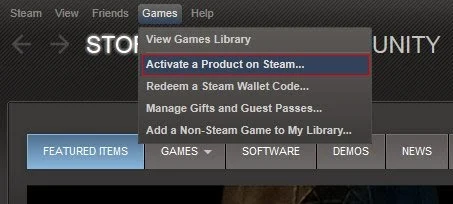
- Open the Steam client, login and locate the Games tab on the top menu. Click this and then select “Activate a Product on Steam…”
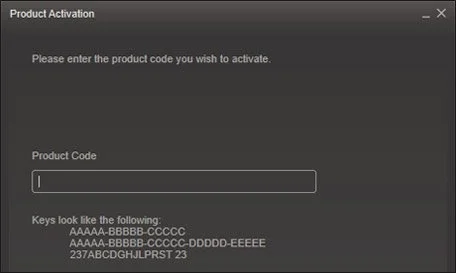
- Enter your unique code that's displayed on the 'Orders' page of CDKeys.com and follow the prompts to activate.
- Your game is now viewable in the “Library” tab and is available to download/install when you’re ready.
You can find additional support for the Steam client here: https://help.steampowered.com/en/wizard/HelpWithSteam



