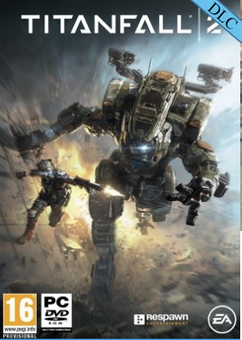
Titanfall 2 PC - Nitro Scorch Pack DLC
Platform
EA App
Release Date
28 Oct 2016
Language
English,Spanish,French,German,Italian,Chinese Traditional,Russian
Developer
Respawn Entertainment
Top benefit: Delivery Time 1-3 secondFully automated trading
QUANTITY
- +
Add Cart
Surprise activity: Use the coupon "ffttl" to get a 5%-35% discount,Before Discount Price : USD 92.79$
-36%
USD 144.63$
USD 92.79$
FAQ
Load More
  • NOTE: This content requires the base game Titanfall 2 in order to play.

    Get instant download of Titanfall 2 Nitro Scorch Pack on PC with ffttl.com

    The top 3 reasons to play Titanfall 2 Nitro Scorch Pack

    1. Enjoy an exhilirating first-person shooting experience in the sequel, Titanfall 2.
    2. The Nitro Scorch Pack gives you Nitro Warpaint, Firebrand Nose Art options and more.
    3. Enjoy a new single player campaign that highlights the bond between Pilots and Titans.

    What to know before buying Titanfall 2 Nitro Scorch Pack

    What's included with Titanfall 2 Nitro Scorch Pack?

    • Nitro Warpaint
    • Firebrand Nose Art options
    • GOLD| Beast Mode Callsign

    Is there any region lock for Titanfall 2 Nitro Scorch Pack?

    This product is available worldwide; no region lock.

    How will I receive my instant download for Titanfall 2 Nitro Scorch Pack?

    After payment has been approved, your game key will be included in your order confirmation email. You can access your key by following a link in the email. Next, you can activate your key on its corresponding platform.

    If you’ve pre-ordered a game, your key will be delivered to your email a day before the official (or early access) release date. You will also receive a notification via email when your key becomes available.

    How to activate the key for Titanfall 2 Nitro Scorch Pack

    Activate with Origin:

    • Download and install the Origin client on your PC (https://www.origin.com/usa/en-us/store/download), then sign up and log in.
    • Locate your Origin key in your ffttl.com confirmation email, and copy it to your clipboard by pressing “Ctrl+C”.
    • Open the Origin client, click on the “My Account” section, and then the “Redeem Product Code” tab.
    • Paste the key from your clipboard by pressing “Ctrl+V”, click “Next” to confirm and the game will now be added to your library.
    • Your new game is now activated and ready to download. Once downloaded it will be ready to play!

    You can find additional support for the Origin client here: https://help.ea.com/en/origin/origin/

    Titanfall 2 Nitro Scorch Pack details

    • Enjoy a thrilling single player campaign as you fight against enemy lines and improve your skills.
    • Challenge your friends or form a team in multiplayer modes, and practice your shooting skills against real players.
    • Master your Pilots and Titans as you utilise lethal weapons and improve your abilities.
    • Organise games with your friends easier with the Networks feature, where you can create and manage networks with ease.

    Want to get a free key to play Titanfall 2 Nitro Scorch Pack?

    Our team regularly select the best comments about the game. Make sure to share your feedback in the review tab!

    What are the system requirements for Titanfall 2 Nitro Scorch Pack?

    MINIMUM for Titanfall 2 Nitro Scorch Pack

    • ProcessorIntel Core i3-6300t or equivalent [4 or more hardware threads]
    • GraphicsNVIDIA Geforce GTX 660 2GB or AMD Radeon HD 7850 2GB
    • Memory8 GB RAM
    • Disk space45 GB
    • SystemWin 7/8/8.1/10 64bit
    • DirectXVersion 11
    • Network512 KBPS or faster

    RECOMMENDED for Titanfall 2 Nitro Scorch Pack

    • ProcessorIntel Core i5-6600 or equivalent
    • GraphicsNVIDIA Geforce GTX 1060 6GB or AMD Radeon RX 480 8GB
    • Memory16 GB RAM
    • Disk space45 GB
    • SystemWin 7/8/8.1/10 64bit
    • DirectXVersion 11
    • Network512 KBPS or faster

    Genre

    FPS, Multiplayer, Shooter, Singleplayer
  • Please note EA App is only available for Windows. Download Origin client for MacOS

    Activate with EA App:

    1. Click here, to download the EA App for Windows
    2. Log in to your EA Account
    3. Open My Collection.
    4. Select Redeem Code
    5. Enter your unique code that's displayed on the 'Orders' page of CDKeys.com and follow the prompts to activate.

    Activate with Origin Client:

    For Windows:

    1. Log in with the EA Account where you want to add the game.
    2. Click the Origin menu
    3. Select Redeem Code
    4. Enter your unique code that's displayed on the 'Orders' page of CDKeys.com and follow the prompts to activate.

    For Mac:

    1. Log in with the EA Account where you want to add the game.
    2. Go to your computer’s top menu to select Games and Redeem Code
    3. Enter your unique code that's displayed on the 'Orders' page of CDKeys.com and follow the prompts to activate.

    To Redeem EA Gift Card:

    1. Go to your EA Account and Billing settings.
    2. Click on Payment Methods.
    3. Next to EA Wallet, click Add More.
    4. Enter your unique code that’s displayed on the ‘Orders’ page of CDKeys.com.
    5. Read and accept the Terms and Conditions.
    6. Click Submit.
FFTTL is your trusted platform to buy cheap game CD keys and digital codes. Enjoy instant delivery, huge discounts, and a wide range of popular games. Shop now and save!
paypal visa mastercard
$144.63
$92.79
Buy Now