
 0
0






Get your instant download with ffttl.com
This product includes the Tekken 7 Season Pass for PC. Base game required.
The top 3 reasons to get the Tekken 7 Season Pass
- The Season Pass enhances your Tekken 7 experience with new special characters, a unique game mode, and much more.
- Get instant access to over 30 metallic costumes for your characters.
- The only way to play as some of the most iconic Tekken 7 characters is with the Season Pass!
About the Tekken 7 Season Pass
- Expand your fighter's journey with the TEKKEN 7 Season Pass and gain access to stunning DLC packs at a discounted price.
- Challenge your skills, your friends and rivals with two additional playable characters, a new game mode and hundreds of additional costumes.
- As an exclusive gift for purchase, receive over 30 metallic costumes for your characters and shine in the Iron Fist Tournament!
What are the system requirements?
MINIMUM
- OSWindows 7/8/10 (64-bit OS required)
- ProcessorIntel Core i3-4160 @ 3.60GHz or equivalent
- Memory6 GB RAM
- GraphicsNVIDIA GeForce GTX 660 2GB, GTX 750Ti 2GB, or equivalent
- DirectXVersion 11
- NetworkBroadband Internet connection
- Storage60 GB available space
- Sound CardDirectX compatible soundcard or onboard chipset
RECOMMENDED
- OSWindows 7/8/10 (64-bit OS required)
- ProcessorIntel Core i5-4690 3.5 GHz or equivalent
- Memory8 GB RAM
- GraphicsNVIDIA GeForce GTX 1060 equivalent or higher
- DirectXVersion 11
- NetworkBroadband Internet connection
- Storage60 GB available space
- Sound CardDirectX compatible soundcard or onboard chipset
Genre
Action, Fighting, Sports-
Activate with Steam:

- Download and install the Steam client on your PC.
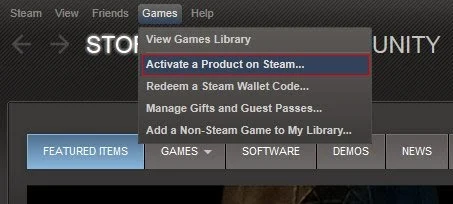
- Open the Steam client, login and locate the Games tab on the top menu. Click this and then select “Activate a Product on Steam…”
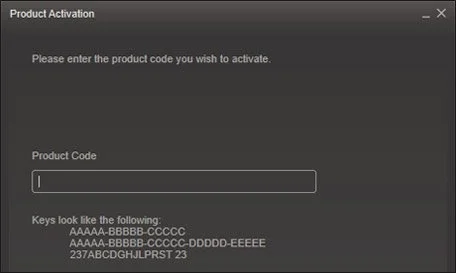
- Enter your unique code that's displayed on the 'Orders' page of CDKeys.com and follow the prompts to activate.
- Your game is now viewable in the “Library” tab and is available to download/install when you’re ready.
You can find additional support for the Steam client here: https://help.steampowered.com/en/wizard/HelpWithSteam



