
 0
0





ABOUT THE DLC
This content requires the base game.
With All That Jazz, Paradox is introducing an all new kind of traffic jam in Cities: Skylines. The briefly internet-famous Jazz Boatman returns as DJ, so players can dig harder than a jackhammer at a road repair. The new All That Jazz radio station will feature 16 new songs across several smooth genres: Classic, Latin, Funky and Chill-Out Jazz.
1. Houston River Jazz Collective - 36th Street
2. Houston River Jazz Collective - Hallet's Cove
3. Houston River Jazz Collective - Northern Boulevard Jam
4. Houston River Jazz Collective - The Astoria Way
5. Jazz In-Clave - Bauza Chico
6. Jazz In-Clave - Habanera Big Four
7. Jazz In-Clave - Ponchando Fashion
8. Jazz In-Clave - Tresillo Hideaway
9. Phrase It Differently - Fusionistic Mystic
10. Phrase It Differently - 7 O'Clock
11. Phrase It Differently - Cracks
12. Phrase It Differently - Loveshift
13. The Sierra Lewis Project - Fiesta Siesta
14. The Sierra Lewis Project - A Walk In The Park
15. The Sierra Lewis Project - The Conquistador
16. The Sierra Lewis Project - Praia Verdi
What are the system requirements?
WIndows
- OSWindows® 7 64 Bit | Windows® 8.1 64 Bit | Windows® 10 Home 64 Bit
- ProcessorIntel® Core™ I7 930 | AMD® FX 6350
- Memory8 GB RAM
- GraphicsNvidia® GeForce™ GTS 450 (1 GB) | AMD® R7 250 (2 GB) | Intel Iris Xe G7 (Tiger Lake)
- Storage 4 GB available space
macOS
- OSOS X 10.11 (64-bit)
- Processor Intel Core 2 Duo, 3.0GHz
- Memory 4 GB RAM
- Graphics nVIDIA GeForce GTX 260, 512 MB or ATI Radeon HD 5670, 512 MB (Does not support Intel Integrated Graphics Cards)
- Storage 4 GB available space
SteamOS + Linux
- OSUbuntu 12.04 (64-bit)
- Processor Intel Core 2 Duo, 3.0GHz or AMD Athlon 64 X2 6400+, 3.2GHz
- Memory4 GB RAM
- Graphics nVIDIA GeForce GTX 260, 512 MB or ATI Radeon HD 5670, 512 MB (Does not support Intel Integrated Graphics Cards)
- Storage 4 GB available space
Genre
Simulation, StrategyPlatform
PC (WW)-
Activate with Steam:

- Download and install the Steam client on your PC.
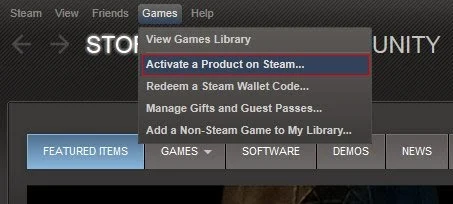
- Open the Steam client, login and locate the Games tab on the top menu. Click this and then select “Activate a Product on Steam…”
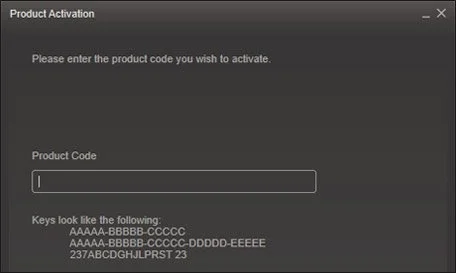
- Enter your unique code that's displayed on the 'Orders' page of CDKeys.com and follow the prompts to activate.
- Your game is now viewable in the “Library” tab and is available to download/install when you’re ready.
You can find additional support for the Steam client here: https://help.steampowered.com/en/wizard/HelpWithSteam



